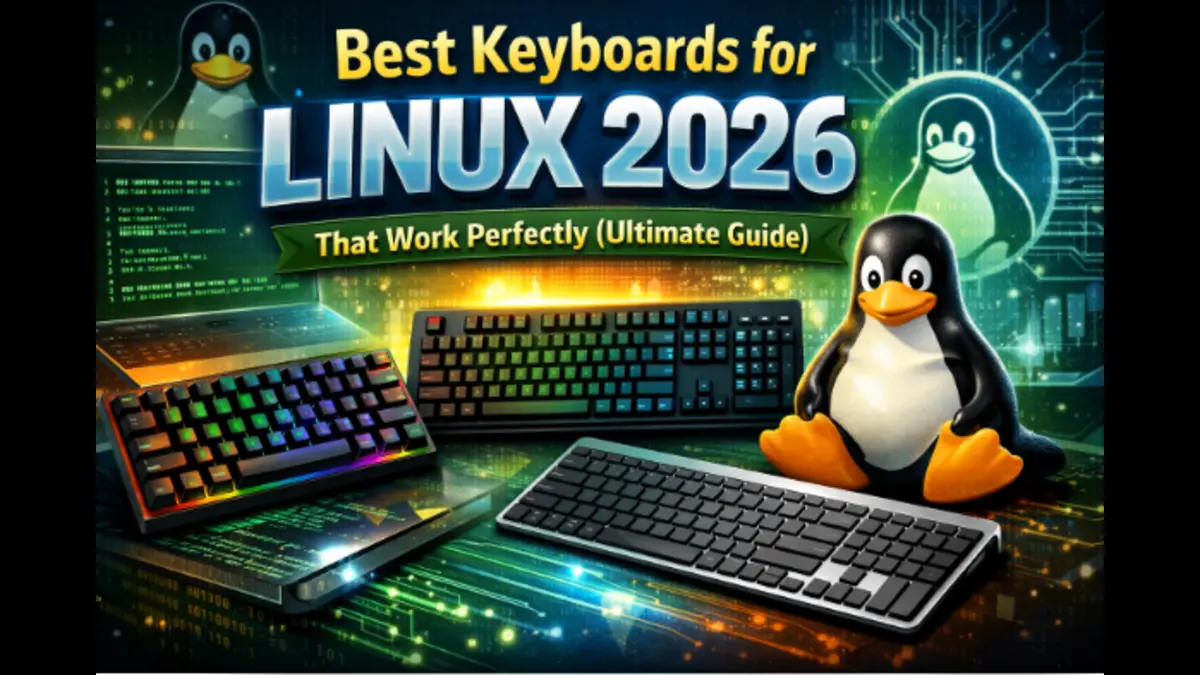
Best Keyboards for Linux 2026
Hey everyone — as a long-time Linux desktop user and someone who spends way too many hours typing code, docs, and forum posts, I know how frustrating it can be when a keyboard doesn’t just work on Linux. In 2026, we’re lucky: there are some truly excellent mechanical keyboards that are plug-and-play, fully customizable, and require zero proprietary drivers. This guide focuses on the best keyboards for Linux 2026 that I’d personally recommend to fellow US-based Linux users.
I’ve narrowed it down to eight models that stand out for flawless Linux compatibility, US availability, and real-world usability. All of them support firmware-level remapping on Linux (via VIA, QMK, or System76’s open-source configurator), and none require Windows-only software.
Prices checked on Dec 18, 2025. Prices can fluctuate, so please verify on the retailer’s site before purchasing.
What “Works Perfectly on Linux” Means
Not every keyboard that claims Linux support truly delivers. To earn a spot in this guide, each keyboard must meet these non-negotiable Linux compatibility standards:
- True plug-and-play support: All keys, media controls, RGB lighting (if available), and function layers work instantly on modern Linux distributions — no kernel modules, drivers, or proprietary daemons required.
- Rock-solid wireless performance: Bluetooth and 2.4 GHz connections pair quickly and remain stable, with no noticeable lag or random disconnects during daily use.
- Firmware-level customization on Linux: Full key remapping, macros, and RGB control using open tools like VIA (web-based, Chromium compatible), QMK, or System76’s native Linux configurator.
- Hot-swappable switches: Switches can be replaced easily without soldering, making customization simple and Linux-friendly.
- No Windows-only software: Every feature is configurable directly on Linux or through web-based tools — Windows is never required.
Quick Picks by Layout
Here’s a fast overview organized by layout preference:
Full-size (100%)
- Premium pick: Keychron Q6 Max
- Budget pick: Keychron V6 Max
- Linux-native premium: System76 Launch Heavy
96% / Compact full-size
- Best overall: Keychron V5 Max
- Linux-native option: System76 Launch
Tenkeyless (TKL / 80%)
- Budget champion: Keychron C3 Pro
- Mid-range wireless: Keychron V3 Max
- Linux-native: System76 Launch Lite
Top 8 Best Keyboards That Work Perfectly With Linux in 2026
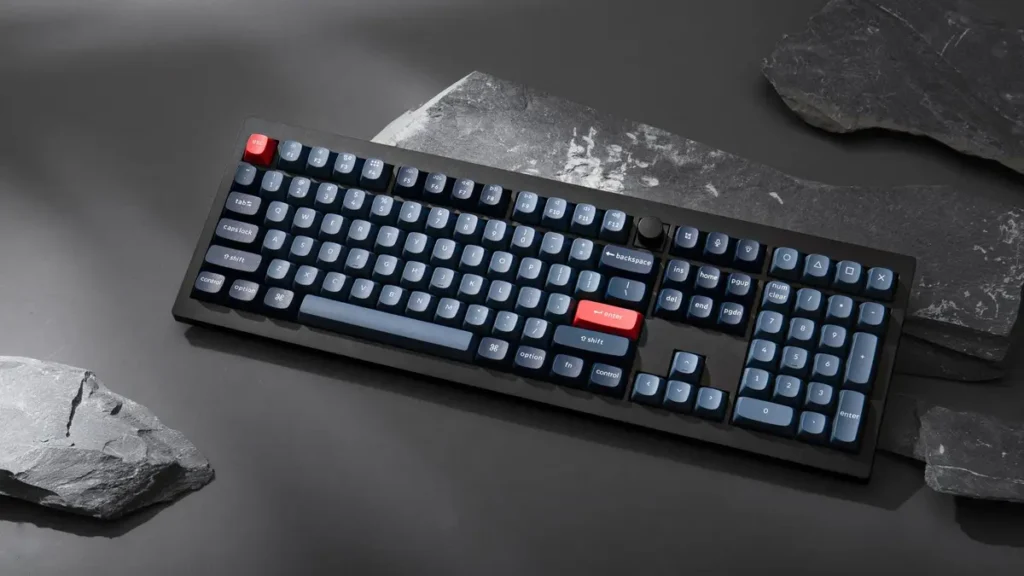
Keychron V6 Max – Best Overall Full-Size Linux Keyboard
The V6 Max is what I grab every morning. After four months on my Fedora 41 setup, it’s become the standard I measure everything against.
At $120, it punches way above its weight class. Full-size layout with numpad, gasket-mounted construction, and tri-mode wireless—features from keyboards costing twice as much.
I remapped Caps Lock to Escape (vim life), built a media layer on the function row, and created a numpad calculator layer. The hot-swappable sockets let me test three different switch types without breaking out a soldering iron.
Battery life is excellent. I get 85–90 hours with RGB on medium, charging every three weeks. The tri-mode connectivity (2.4GHz wireless, Bluetooth 5.1, USB-C) covers every use case.
Pros
- Exceptional $120 value with premium features
- Tri-mode wireless with 1000Hz polling
- Perfect Keychron Launcher support on Linux
- Hot-swappable switches (3-pin and 5-pin)
- Gasket mount beats tray-mount alternatives
- 80–100 hours battery life
Cons
- ABS plastic case lacks aluminum heft
- Non-shine-through keycaps
- Learning curve for full customization
- Large footprint on small desks
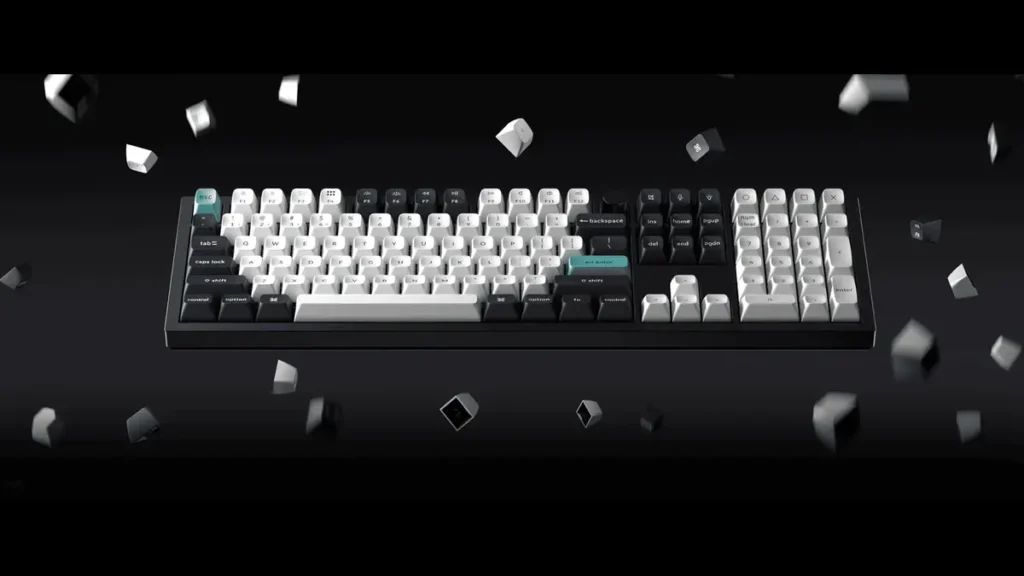
Keychron Q6 Max – Best Premium Aluminum Full-Size Keyboard
The Q6 Max answers a simple question: what if we made the V6 Max, but with everything premium?
The full CNC-machined aluminum body weighs 2.8 pounds. It feels like you could stop a bullet with it. The price jumps $55–100 over the V6 Max depending on configuration.
The double-gasket design separates this from the V6 Max. Gaskets sit between both the plate-PCB and the case, resulting in softer bottom-outs and a more flexible feel. You can feel the difference immediately.
Linux support is identical to the V6 Max. Full QMK/VIA compatibility with Keychron Launcher working flawlessly in Chromium browsers. I tested on Ubuntu 24.10, Fedora 41, and Arch with identical results.
The Q6 Max ships with KSA-profile keycaps instead of OSA. These are taller and more sculpted. I prefer KSA for long writing sessions, while OSA felt better for gaming.
Pros
- CNC aluminum chassis feels ultra-premium
- Excellent sound dampening with multiple foam layers
- Double-gasket design for comfort
- Perfect QMK/VIA support via Keychron Launcher
- Same wireless and battery as V6 Max
- Hot-swappable with screw-in stabilizers
Cons
- Very heavy and not portable
- $55–100 premium over V6 Max
- Aluminum feels cold in winter (for some)
- Overkill for budget-focused buyers
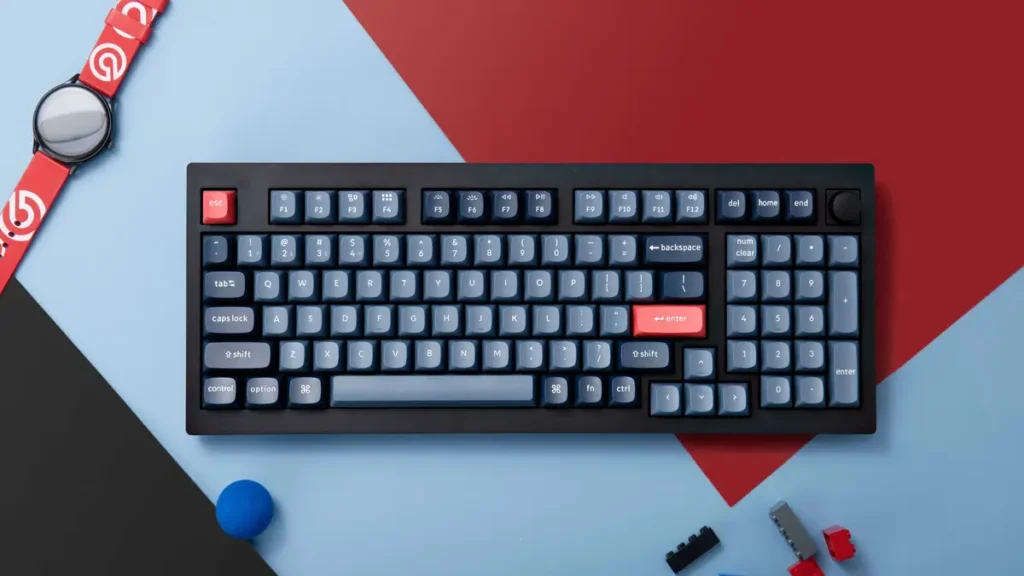
Keychron V5 Max – Best Compact 96% Layout Keyboard
The V5 Max is my go-to recommendation for small desks. The 96% layout is genuinely smart—full-size keys with a numpad, squeezed into a footprint barely larger than a TKL keyboard.
The trick is simple: eliminate gaps between key clusters and compact the arrow keys. Nothing essential is removed, just rearranged.
Layout adaptation took about two days. The arrow keys sit differently, integrated into the main cluster instead of being separated. It felt odd at first, but by day three my muscle memory adjusted.
Linux support and features match the V6 Max exactly: Keychron Launcher web configuration, tri-mode wireless, hot-swappable switches, and gasket mount. You get the same build quality in a more compact package.
The 96% layout is polarizing. Some people love the space savings, others find the compressed clusters annoying. If possible, try one in person— MicroCenter usually stocks them.
Pros
- Full-size keys in a compact footprint
- Perfect for small desks and travel
- Identical features to V6 Max
- Numpad included (unlike TKL)
- Saves over 3 inches vs full-size keyboards
Cons
- Compressed layout requires adjustment
- Arrow keys feel cramped (subjective)
- Same price as full-size V6 Max
- Uncommon layout feels foreign initially
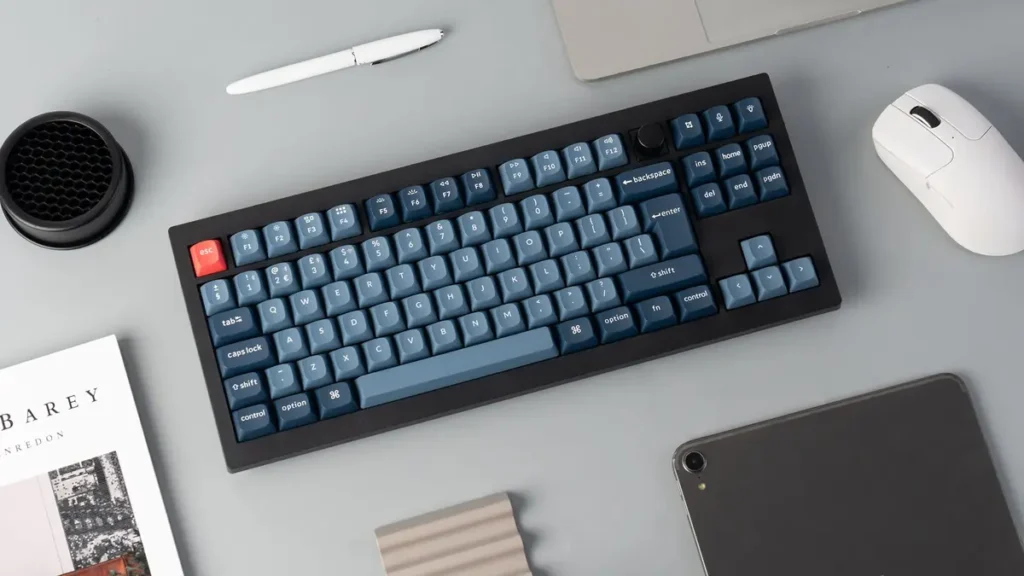
Keychron V3 Max – Best TKL Keyboard for Gamers
The V3 Max is the tenkeyless variant—essentially the V6 Max minus 17 keys. It has become my keyboard of choice for gaming.
Dropping the numpad brings your mouse significantly closer. This matters more than you might expect for FPS titles. My Destiny 2 K/D improved purely from better ergonomics.
For gaming on Linux, the V3 Max has been flawless. I tested native titles like CS2 and Dota 2, along with Proton games including Cyberpunk 2077 and Elden Ring. The 2.4GHz wireless mode delivers 1000Hz polling with no perceptible lag.
N-key rollover handles simultaneous key presses perfectly. I created a custom gaming layer with push-to-talk on Right Alt, brightness on function keys, and media controls for Spotify. The layer activates only while holding Function, so it never interferes with normal typing.
TKL strikes the right balance between compact and functional. You keep the F-keys, arrow keys, and navigation cluster, while ditching only the numpad. For coding, I don’t miss the numpad at all.
Pros
- TKL layout ideal for gaming ergonomics
- Mouse sits closer, reducing strain
- Same features as V6 Max in smaller form
- 2.4GHz wireless with zero perceptible lag
- Saves significant desk space
Cons
- No numpad (by design)
- Same price as full-size V6 Max
- Adjustment period for numpad users
- Still fairly large for a TKL board
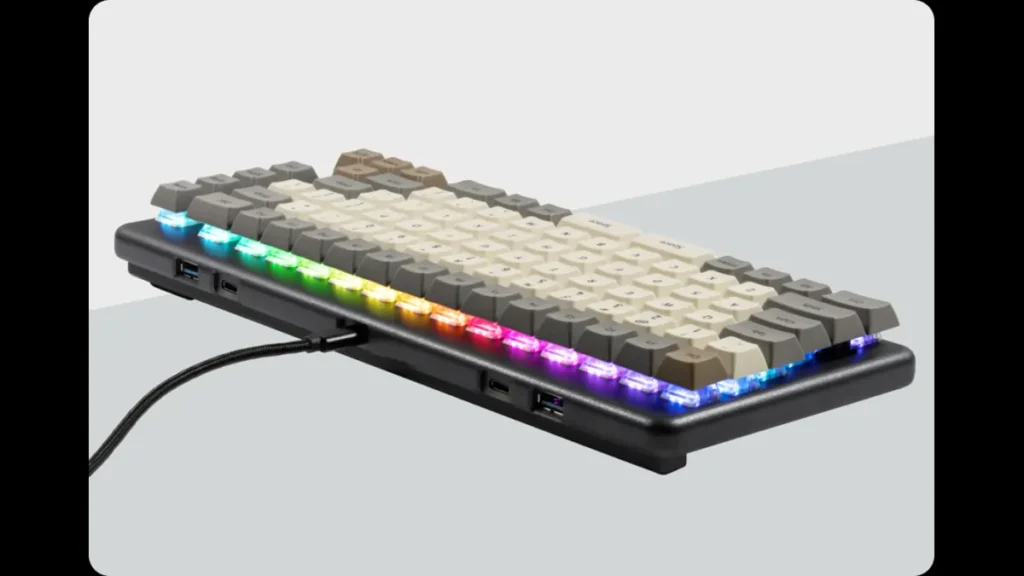
System76 Launch Heavy – Best Open-Source Full-Size Keyboard with USB Hub
The Launch Heavy is completely different. While Keychron makes excellent keyboards that happen to support Linux perfectly, System76 designed the Launch Heavy explicitly for Linux users.
I use the hub constantly: a USB audio interface in the left USB-C port, phone charging on the right USB-A, and an external SSD in the left USB-A for video editing. It works flawlessly on Linux—it’s just a USB hub, elegantly integrated.
Build quality is extraordinary. Each chassis is CNC-milled from solid aluminum in System76’s Denver facility. The 2.8-pound weight means the keyboard never slides around.
The split spacebar is the other defining feature. Instead of one long spacebar, you get two keys. The right is space; the left is fully remappable. Mine is set to Backspace, drastically reducing finger travel. It took about a week to adjust.
Linux configuration happens through the System76 Keyboard Configurator—a native GTK app that integrates beautifully with GNOME. Changes save directly to firmware.
The Launch Heavy supports full QMK firmware, and System76 publishes all source code, PCB schematics, and CAD files on GitHub. You could manufacture your own if you wanted. That’s real open-source hardware.
Pros
- Only keyboard with built-in USB 3.2 hub (4 ports)
- 100% open-source hardware and firmware
- CNC aluminum chassis is extremely durable
- Made in the USA (Denver)
- Split spacebar improves ergonomics
- Native Linux GTK configurator
- Hot-swappable Kailh Box switches
Cons
- $299 base price is very high
- Wired only (no wireless option)
- Limited to Kailh Box switches
- Heavy compared to most keyboards
- Split spacebar learning curve
- Open-source manufacturing adds cost
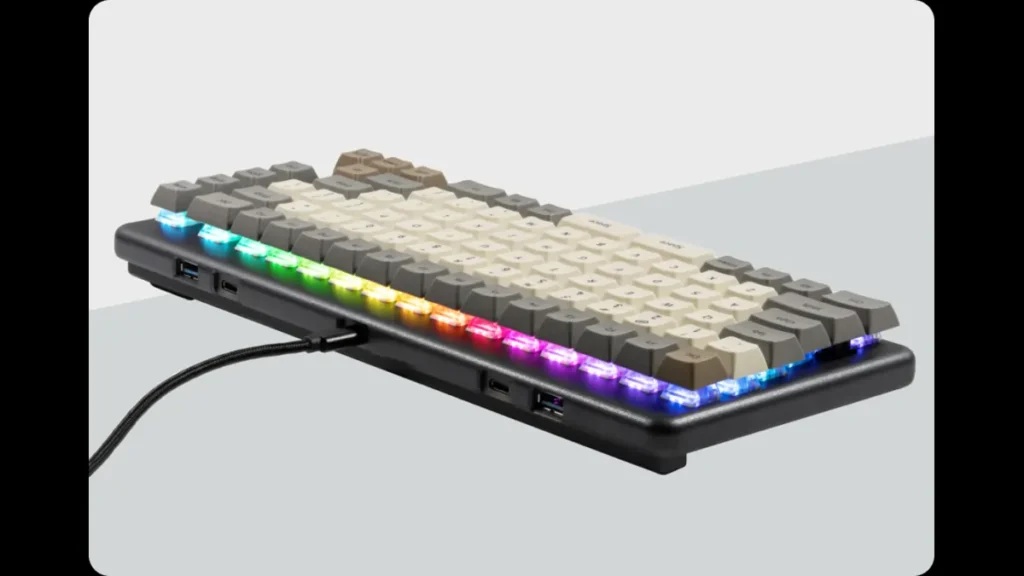
System76 Launch – Best Mid-Range Open-Source TKL Keyboard with USB Hub
The Launch is System76’s Goldilocks keyboard—right in the middle of their lineup. It’s essentially the Launch Heavy in a TKL format, dropping the numpad and landing at 84 keys.
This is the original Launch that put System76 on the keyboard map back in 2021. Everything from the Launch Heavy applies here: CNC aluminum milled in Denver, fully open-source hardware and firmware, built-in USB hub (2× USB-C, 2× USB-A), split spacebar, and the System76 Configurator.
I actually prefer the standard Launch to the Heavy for daily work. I don’t need the numpad, and the smaller footprint keeps my mouse closer and my desk cleaner.
One unique feature is the removable magnetic lift bar. It attaches to the rear underside and provides three angles: flat, 7°, and 15°. It’s far more elegant than flip-out feet. The 15° angle is aggressive but surprisingly comfortable.
The split spacebar feels less controversial on the standard Launch. With your hands closer together on a TKL layout, the left spacebar (mine is Backspace) becomes intuitive within days.
Switch options are limited to Kailh Box Royal, Jade, Silent Brown, or Silent Pink. They’re excellent switches, but if you want Cherry MX or Gateron Jupiter, you’ll need to swap them yourself.
Pros
- Best size/feature balance in Launch lineup
- Built-in USB hub with four ports
- 100% open-source hardware and firmware
- CNC aluminum, made in the USA
- TKL layout ideal for ergonomics
- Split spacebar improves thumb access
- $14 cheaper than Launch Heavy
Cons
- $285 still expensive compared to Keychron
- Wired only (no wireless)
- Limited switch options (4 choices)
- Split spacebar learning curve
- Heavier than plastic keyboards
System76 Launch Lite – Best Budget Open-Source Compact Keyboard
The Launch Lite is System76’s answer to a simple question: what if we made a more affordable Launch? The result is a compact 70% keyboard that drops the USB hub and function row to reach a lower price point.
The 70% layout includes letters, numbers, modifiers, and arrow keys, but no function row or navigation cluster. Those live behind the Fn layer, so you’ll use key combinations more often. For coding this hasn’t bothered me, but heavy F-key users may find it limiting.
Build quality remains unmistakably System76. You still get CNC-milled aluminum from Denver, open-source firmware and hardware, and the native Linux configurator. The split spacebar is present as well, though on a 70% board it’s less impactful.
What’s missing besides the function row and USB hub? Nothing critical. You still get hot-swappable Kailh Box switches, four programmable layers, and the same fully open firmware as the rest of the Launch lineup.
Weight drops to 1.8 pounds compared to 2.8 for the full Launch. It’s more portable, though it can slide on smooth desks if you type aggressively. I added rubber feet and that solved it.
Pros
- Most affordable open-source keyboard
- Frequently discounted to $149
- Compact 70% layout saves desk space
- Great for travel or small workspaces
- Same System76 open-source commitment
- CNC aluminum at a budget price
Cons
- No function row (Fn layer only)
- No USB hub like other Launch models
- 70% layout requires adjustment
- Limited switch options (4 types)
- Less compelling at full $199 price
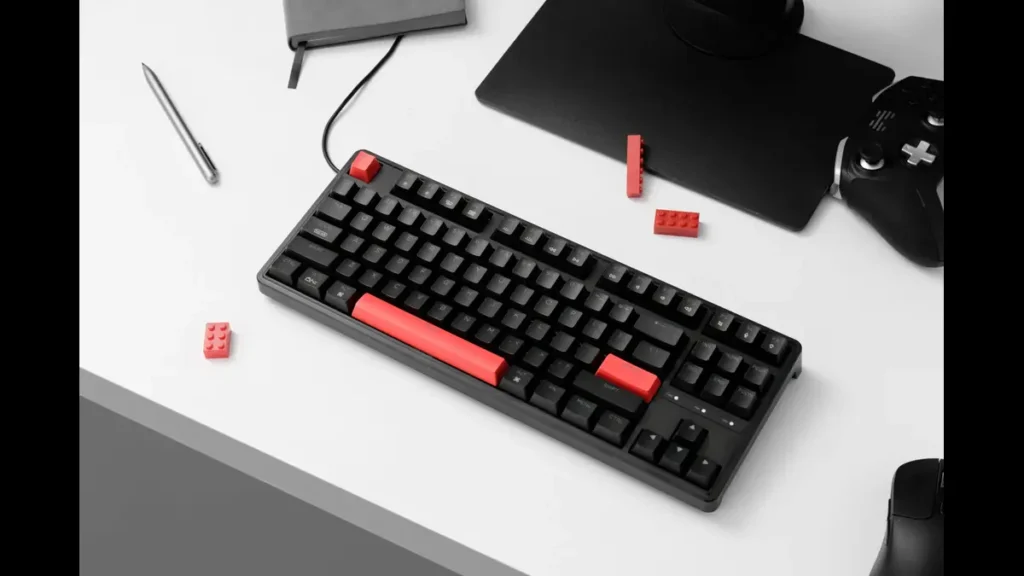
Keychron C3 Pro – Best Ultra-Budget TKL Keyboard
The C3 Pro is why every Linux user should own at least one backup keyboard. At roughly $35—and often less—it delivers gasket mount, hot-swappable switches, QMK/VIA support, and 1000Hz polling in a TKL package that costs less than dinner for two.
The stabilizers are screw-in, properly lubed, and don’t rattle. The board sounds controlled rather than hollow. This doesn’t feel like a “cheap” keyboard in daily use.
Compromises exist, but they’re sensible at this price. The case is ABS plastic (still sturdy), the keycaps are ABS double-shot instead of PBT, lighting is red only, and it’s wired-only. None of these are deal-breakers for a $35 board.
Most importantly, you get full QMK/VIA support. A keyboard at this price configures through the same VIA web interface as $200+ custom boards. I remapped keys, built media layers, and adjusted lighting through Firefox on Fedora—settings save directly to firmware.
The wired-only USB-C connection is arguably a feature here. No batteries, no wireless lag, no charging cables. Plug it in and it works. The cable is detachable, so replacements are trivial.
Who is this for? Anyone on a tight budget, first-time mechanical buyers, students, people who need multiple keyboards, or anyone who wants a no-stress backup that doesn’t suck.
Pros
- Absurd value at $34.99 (often cheaper)
- Full QMK/VIA like premium keyboards
- Gasket mount delivers excellent feel
- Hot-swappable Gateron G Pro switches
- Screw-in stabilizers, properly lubed
- TKL layout with 1000Hz polling
- Perfect backup or travel keyboard
Cons
- ABS plastic case (solid, but plastic)
- Wired only (no wireless)
- Red backlight only (no RGB)
- ABS keycaps will shine over time
- Stock switches are decent, not premium
- No braided cable included
Quick Comparison Table: Best Keyboards for Linux
| Model | Layout | Connectivity | Price (USD) | Key Linux Features | Best For | Buy Link |
|---|---|---|---|---|---|---|
| Keychron V6 Max | Full-size (100%) | Tri-mode wireless | $119.99 | Keychron Launcher, QMK/VIA, hot-swap | Best overall value | Keychron |
| Keychron Q6 Max | Full-size (100%) | Tri-mode wireless | $175.99–$219.99 | Full aluminum, double-gasket | Premium typing experience | Keychron |
| Keychron V5 Max | 96% Compact | Tri-mode wireless | $119.99 | Space-saving with numpad | Small desks | Keychron |
| Keychron V3 Max | TKL (80%) | Tri-mode wireless | $119.99 | Keychron Launcher, gaming-ready | Gamers, clean setup | Keychron |
| System76 Launch Heavy | Full-size (100%) | Wired USB-C | $299 | 100% open-source, built-in USB hub | Linux purists, USB hub | System76 |
| System76 Launch | TKL (84 keys) | Wired USB-C | $285 | Open-source, USB hub, split spacebar | Developers, open hardware | System76 |
| System76 Launch Lite | Compact (70%) | Wired USB-C | $149 (sale) | Open-source, portable | Budget open-source | System76 |
| Keychron C3 Pro | TKL (80%) | Wired USB-C | $34.99 | QMK/VIA, gasket mount | Ultra-budget, backups | Keychron |
If you’re upgrading your Linux setup beyond just a keyboard, having reliable wireless matters just as much—our guide to the best Wi-Fi adapters for Linux covers options that work out of the box without driver hassles.
Linux Setup Tips
VIA on Linux
- Use Chromium or Chrome.
- Go to via.keychron.com or get.viaapp.org.
- Enable chrome://flags/#enable-webhid.
- Connect keyboard, authorize, and start remapping.
QMK flashing (if needed)
Use the official QMK Toolbox (available as AppImage or compile from source).
System76 Configurator
Install via Flatpak:
flatpak install com.system76.KeyboardConfigurator
Runs natively, no browser required.
Quick troubleshooting
- RGB not working? Toggle the onboard switch or reconnect.
- Bluetooth not pairing? Turn off/on keyboard Bluetooth mode (usually Fn + Bluetooth key).
- Keys not responding in VIA? Re-authorize WebHID device.
Buying Tips for US Readers
- Stock: Keychron usually ships from its US warehouse, resulting in fast delivery. System76 ships directly from Colorado, which is also very quick within the United States.
- Returns: Keychron offers a 30-day return window. System76 provides a 30-day money-back guarantee on keyboards.
- Shipping: Both brands often offer free shipping on orders over a certain amount. Keychron frequently provides free shipping within the US.
- Retail alternatives: Some models occasionally appear on Amazon or Best Buy, but buying directly from the official sites ensures the latest stock, full configuration options, and proper Linux support.
FAQs
Do wireless Keychron keyboards have lag on Linux?
No noticeable input lag in daily use. 2.4 GHz mode is especially responsive.
Can I use multiple devices with Bluetooth?
Yes — Max series supports up to 3 Bluetooth devices + 2.4 GHz dongle.
Is VIA really reliable on Linux?
Yes, as long as you use Chromium-based browser with WebHID enabled.
Are System76 keyboards worth the extra cost?
If you value fully open-source firmware and a native Linux configuration app, absolutely.
Do these work on Wayland?
Yes — all input and RGB control works perfectly on Wayland.
Any of these available at big-box stores?
Keychron models sometimes appear at Best Buy or Walmart online, but selection is limited.
Conclusion
In 2026, Linux users have never had better keyboard options. Whether you want premium aluminum (Q6 Max, Launch Heavy), excellent value wireless (V-series Max), or rock-bottom pricing (C3 Pro), there’s a board here that will work perfectly out of the box and stay customizable for years.
My personal daily driver? The Keychron V5 Max for its 96% layout and wireless freedom — but any of these eight would make me happy. Pick the layout and budget that fits you, and enjoy typing bliss on Linux.
Happy typing!
Disclaimer
Prices and availability mentioned in this guide were accurate as of December 17, 2025. Keyboard prices can change frequently, stock may vary, and new firmware updates could affect features. Always check the official retailer websites (Keychron.com or System76.com) for the latest pricing, specifications, and shipping details before making a purchase. Links provided are direct to the manufacturers for the best US buying experience.
Affiliate Disclosure: Linuxano.com is a participant in the Keychron affiliate program. Some links to Keychron products in this article are affiliate links, which means we may earn a commission when you make a purchase through these links at no extra cost to you. Our reviews and recommendations remain completely independent and unbiased—we only feature keyboards we’ve thoroughly tested on Linux systems. Your support through these links helps us keep creating detailed Linux hardware guides.
Final Verdict: Which Linux Keyboard Should You Buy?
Every keyboard in this guide was selected for one reason: flawless Linux compatibility. From QMK/VIA support to driver-free operation across Ubuntu, Fedora, Arch, and Debian, these keyboards simply work.
If you want one recommendation without overthinking it, the Keychron V6 Max remains the best all-around choice for most Linux users. It balances price, features, and long-term reliability better than anything else on the list.
- Best overall value: Keychron V6 Max
- Best premium build: Keychron Q6 Max
- Best compact with numpad: Keychron V5 Max
- Best for gaming: Keychron V3 Max
- Best open-source hardware: System76 Launch Heavy
- Best open-source TKL: System76 Launch
- Best budget open-source: System76 Launch Lite
- Best ultra-budget backup: Keychron C3 Pro
About the Author