Key takeaways
- What it is: a 16-inch, 2.6–2.8 kg Linux desktop replacement with a 24-core Intel Core Ultra 9 290HX Plus and RTX 5070 Ti, 5080 or 5090 graphics.
- Starting price: about €2,350 before VAT and duties (roughly $2,630 for US buyers), or €2,795 with German VAT.
- Biggest strengths: cooling headroom, user-serviceable parts, and Linux support from the manufacturer.
- Biggest trade-offs: weight, about 4 hours of light-use battery, and support that runs through Germany.
- Ships: early November 2026, according to TUXEDO.
Why This Review Exists
Linux users who want serious power have usually had to compromise. Thin gaming laptops run hot and loud, and workstation laptops tend to treat Linux as an afterthought. On October 13, 2026, TUXEDO Computers announced a machine built to remove that compromise.
This TUXEDO Stellaris 16 Gen8 review works from the official product page, TUXEDO’s announcement, and independent Linux testing of the same processor in other laptops. I haven’t handled a Stellaris 16 Gen8 yet, since units ship in early November. So you won’t find invented fan-noise figures or battery graphs here. Where TUXEDO makes a claim I can’t verify, I label it as a claim. I’ll update this post once independent tests exist.
TUXEDO Stellaris 16 Gen8 Specs at a Glance
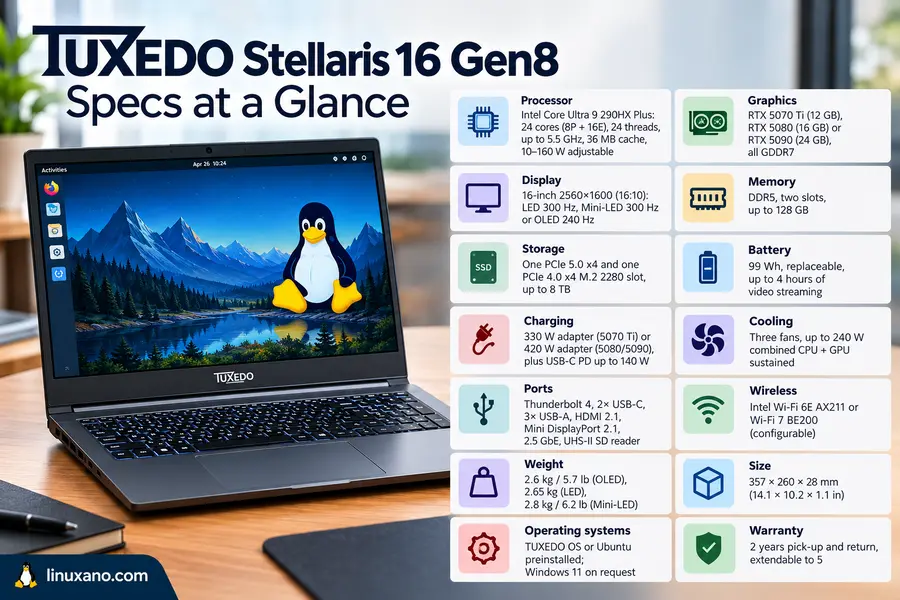
Source: TUXEDO’s official product page, October 2026.
| Component | Details |
|---|---|
| Processor | Intel Core Ultra 9 290HX Plus: 24 cores (8P + 16E), 24 threads, up to 5.5 GHz, 36 MB cache, 10–160 W adjustable |
| Graphics | RTX 5070 Ti (12 GB), RTX 5080 (16 GB) or RTX 5090 (24 GB), all GDDR7 |
| Display | 16-inch 2560×1600 (16:10): LED 300 Hz, Mini-LED 300 Hz or OLED 240 Hz |
| Memory | DDR5, two slots, up to 128 GB |
| Storage | One PCIe 5.0 x4 and one PCIe 4.0 x4 M.2 2280 slot, up to 8 TB |
| Battery | 99 Wh, replaceable, up to 4 hours of video streaming |
| Charging | 330 W adapter (5070 Ti) or 420 W adapter (5080/5090), plus USB-C PD up to 140 W |
| Cooling | Three fans, up to 240 W combined CPU + GPU sustained |
| Ports | Thunderbolt 4, 2× USB-C, 3× USB-A, HDMI 2.1, Mini DisplayPort 2.1, 2.5 GbE, UHS-II SD reader |
| Wireless | Intel Wi-Fi 6E AX211 or Wi-Fi 7 BE200 (configurable) |
| Weight | 2.6 kg / 5.7 lb (OLED), 2.65 kg (LED), 2.8 kg / 6.2 lb (Mini-LED) |
| Size | 357 × 260 × 28 mm (14.1 × 10.2 × 1.1 in) |
| Operating systems | TUXEDO OS or Ubuntu preinstalled; Windows 11 on request |
| Warranty | 2 years pick-up and return, extendable to 5 |
CPU: What Independent Linux Data Tells Us
Every Gen8 uses the same processor, so the CPU isn’t a decision. It’s still worth understanding what you’re buying.
Phoronix, a respected Linux hardware site, tested the Core Ultra 9 290HX Plus in a Razer Blade 18. That is a different laptop, so treat the results as evidence about the chip rather than the Stellaris. Across its benchmark set, the chip was about 60% faster (geometric mean) than the next fastest laptop in the comparison, a Framework 13 with a Ryzen AI 9 HX 370. It also reached its advertised 5.5 GHz boost.
The same review shows the cost. The processor averaged 125 W across the tests and peaked at 221 W. That is a lot of heat for a laptop to shed.
The Stellaris design speaks to exactly that. TUXEDO rates the cooling for up to 160 W on the CPU and 240 W combined, and the TUXEDO Control Center lets you cap CPU power anywhere from 10 W to 160 W. TUXEDO also claims the chip delivers about 91% of its multicore performance at 80 W instead of 150 W, with fans at 45%. That figure is the company’s own, so wait for third-party confirmation.
Early Geekbench listings, reported before launch, put the chip around 6% ahead of the Core Ultra 9 285HX in single-core and 8% in multicore. Treat that as a modest generational refresh rather than a leap.
What it means for you: if you compile large projects, run virtual machines, or render, this CPU has plenty of headroom. If you mostly browse and write code, you’ll probably run it power-limited and quiet.
GPU Options: RTX 5070 Ti vs 5080 vs 5090
| GPU | VRAM | Official TGP range* | Good for |
|---|---|---|---|
| RTX 5070 Ti | 12 GB GDDR7 | 60–115 W | 1440p gaming, general creative work |
| RTX 5080 | 16 GB GDDR7 | 80–150 W | High-end 1440p, 4K editing, 3D |
| RTX 5090 | 24 GB GDDR7 | 90–150 W | 4K gaming, large local AI models |
*Plus 25 W Dynamic Boost. TUXEDO’s technical table and its marketing text list slightly different GPU power ranges. I used the technical table, and the cooling is rated for up to 175 W on the GPU either way.
TUXEDO’s own estimate is roughly 15% more performance with each step up. That’s a manufacturer estimate, but it fits how these GPU tiers usually scale.
My buying logic: VRAM matters more than raw speed. Move to the 5080 if 12 GB is limiting your projects. Choose the 5090 only if you need 24 GB, for example for bigger local language models or heavy scenes. For gaming alone, the 5090 is the hardest upgrade to justify.
Display Options
| LED | Mini-LED | OLED | |
|---|---|---|---|
| Refresh rate | 300 Hz | 300 Hz | 240 Hz |
| Brightness | 500 nits | 750 nits SDR / 1,000 HDR | 500 nits SDR / 1,000 HDR |
| Colour | 100% DCI-P3 | 100% DCI-P3 | 100% DCI-P3 |
| Finish | Matte | Matte | Glossy |
| Extras | MUX switch, no PWM | G-SYNC, Advanced Optimus | MUX switch, 100,000:1 contrast |
Mini-LED suits most buyers. The matte finish handles window glare, and G-SYNC helps gaming. OLED is the pick for photo, video and film work in controlled lighting. TUXEDO says it is designed for indoor use.
Linux caveat: TUXEDO states that HDR is currently fully supported only on Windows 11. If HDR is why you’re paying for Mini-LED or OLED, plan for a Windows install or accept SDR on Linux for now.
Cooling, Build Quality and Ports
Cooling. Two 80 mm fans plus a small 46 mm fan cool the system. The 28 mm thickness leaves room for large heatsinks. For desk use, the optional TUXEDO Aquaris external liquid-cooling dock plugs into a dedicated rear port. TUXEDO says it cuts noise and chassis temperature at full performance. Check its current price before budgeting.
Build. The lid, base and bottom case are aluminum, and the display frame is plastic. Add 0.75–0.8 kg for the power brick and this is a bag-weight laptop, not a slip-in-anywhere one.
Upgradeability. This is the strongest practical advantage. Remove the bottom cover and you can reach both SSD slots, both RAM slots, the Wi-Fi card and the screwed-in battery. A laptop that can be repaired and expanded often stays useful for years longer.
Ports. Rear connections (power, HDMI 2.1, Mini DisplayPort 2.1, Thunderbolt 4) keep desk cabling tidy. The laptop can drive at least four displays, and USB-C charging up to 140 W lets you carry a lighter charger for occasional trips.
Keyboard note: backlighting is single-color on Linux and per-key RGB on Windows.
Battery: TUXEDO quotes up to 4 hours of video streaming. Expect much less under load.
The Linux Experience
You can buy similar silicon elsewhere for less. The difference here is support.
- TUXEDO OS or Ubuntu LTS is preinstalled, with optional full-disk encryption.
- TUXEDO Control Center handles power limits and fan curves.
- A WebFAI recovery USB drive is included for restoring the factory Linux setup.
- Firmware switches can disable the webcam, microphone, Wi-Fi and Bluetooth.
- There is a physical webcam shutter.
Windows 11 is available on request. TUXEDO notes that pre-encrypted installs can’t be dual-booted with Windows.
Price and Buying From the USA
- Base price: about €2,350 excluding VAT and duties, roughly $2,630 for US customers per 9to5Linux. The base configuration has the RTX 5070 Ti, 16 GB DDR5-5600, a 500 GB SSD and the 500-nit LED display.
- Germany: €2,795 including 19% VAT.
- High-end builds: TUXEDO publishes only the base price. Several outlets estimate that an RTX 5090 plus OLED configuration can approach €4,000, but that is a press estimate, not an official figure. Use TUXEDO’s configurator for exact numbers.
- Shipping to the USA: a flat €99, per TUXEDO’s shipping table.
- Duties and taxes: you pay these to local authorities, not to TUXEDO. Check current customs rules before ordering.
- Timing: pre-orders ship from early November 2026, and TUXEDO warns pre-order delays can’t be ruled out.
How It Compares
| Stellaris 16 Gen8 | Framework Laptop 16 | Razer Blade 18 | |
|---|---|---|---|
| CPU | Core Ultra 9 290HX Plus | Ryzen AI 9 HX 370 | Core Ultra 9 290HX Plus (as tested by Phoronix) |
| Graphics | RTX 5070 Ti / 5080 / 5090 | Up to RTX 5070 (12 GB) module | Varies by configuration |
| Linux position | Preinstalled, vendor-supported | Linux-friendly; Phoronix reports new hardware works well | Razer’s first Linux-certified laptop (per Phoronix) |
| Upgradeability | RAM, 2 SSDs, Wi-Fi, battery | Modular, including swappable GPU module | Varies |
| Support base | Germany | US-based vendor | US-based vendor |
Versus Framework Laptop 16: Framework wins on modularity, since the graphics module is swappable, and on US availability. In Phoronix’s 2026 testing, a Razer Blade 18 with the 290HX Plus was about 1.32× faster than the Framework 16 but drew roughly 3× the SoC power. That tells you the Stellaris’ CPU is much faster, at the price of heat and power. Framework tops out at an RTX 5070, so it can’t match the Stellaris on GPU headroom.
Versus Razer Blade 18: it uses the same CPU and, according to Phoronix, is Razer’s first Linux-certified laptop. But Linux is a certification there, not the business model. TUXEDO’s pitch is a complete Linux-first experience.
Versus the Gen7: the previous model used the Core Ultra 9 275HX and is now listed as sold out. The Gen8’s gains are the refreshed CPU and a G-SYNC-capable Mini-LED panel.
Pros and Cons
Pros
- Up to 240 W of combined sustained cooling in a 28 mm chassis
- Linux preinstalled and supported by the manufacturer
- RAM, both SSDs, Wi-Fi and battery are user-serviceable
- Three panel choices, including a G-SYNC Mini-LED
- Optional warranty up to 5 years
- Strong port selection, including UHS-II SD and 2.5 GbE
- Fine-grained power and fan control
Cons
- 2.6–2.8 kg plus a heavy charger
- About 4 hours of battery in light use
- Full HDR currently needs Windows 11
- Single-color keyboard backlight on Linux
- Service runs through Germany, with duties and €99 shipping for US buyers
- No independent thermal, noise or battery data yet
Which Configuration Should You Buy?
The sensible default: RTX 5070 Ti + Mini-LED. The best value for developers, hobbyist creators and gamers. Choose the Wi-Fi 7 card if your router supports it.
The creator build: RTX 5080 + OLED or Mini-LED, 64 GB RAM. For 4K video, Blender and heavy multitasking. The extra 4 GB of VRAM matters more than the speed gain.
The AI and VRAM build: RTX 5090 + 64–128 GB RAM. Justified only if your models or scenes need 24 GB. Budget for a price approaching the high end of the range and the 420 W adapter.
Skip it if you commute daily with your laptop, need all-day battery life, or require next-day on-site service in the USA.
What to Watch for in the First Independent Reviews
- Fan noise in decibels at 80 W and at full power
- Sustained CPU and GPU clocks after 30 minutes
- Real battery life, not just the quoted 4 hours
- How well HDR and G-SYNC behave under Linux
- Keyboard feel and touchpad accuracy
Is It the Ultimate Linux Workstation Laptop?
On paper, the TUXEDO Stellaris 16 Gen8 is one of the strongest Linux-first workstation laptops to consider. This TUXEDO Stellaris 16 Gen8 review comes down to a clear trade-off: substantial performance potential and repairability in exchange for portability and battery life.
What Looks Promising
High-end CPU and GPU options, substantial cooling hardware, replaceable components, and Linux-focused software support.
What to Consider
A heavy chassis, modest advertised battery life, and a European support and warranty process that may be less convenient for buyers elsewhere.
If you need a powerful Linux workstation and value upgradeability, the Stellaris 16 Gen8 deserves a place on your shortlist. If portability or long battery life matters most, consider alternatives.
Wait for independent hands-on reviews to verify noise levels, sustained performance, and temperatures under heavy workloads before making your final decision.
Testing status: This 8.5/10 score is provisional and based on specifications, not completed hands-on testing. Reassess the rating when independent test results become available.
Frequently Asked Questions
When does the TUXEDO Stellaris 16 Gen8 ship?
Pre-orders opened on October 13, 2026, with first shipments planned for early November 2026.
How much does the Stellaris 16 Gen8 cost?
It starts at about €2,350 before VAT and duties, roughly $2,630 for US customers, or €2,795 including German VAT.
What CPU does it use?
Every model uses the Intel Core Ultra 9 290HX Plus, with 24 cores and boost speeds up to 5.5 GHz.
Which GPUs can I choose?
You can choose the NVIDIA GeForce RTX 5070 Ti (12 GB), RTX 5080 (16 GB) or RTX 5090 (24 GB).
Does it run Windows 11?
Yes, TUXEDO installs Windows 11 on request, and full HDR on the Mini-LED and OLED panels currently works only on Windows.
How long does the battery last?
TUXEDO quotes up to 4 hours of video streaming from the 99 Wh battery.
Does TUXEDO ship to the USA?
Yes, shipping to the USA is a flat €99, and buyers pay any import duties and taxes locally.
Disclaimer: This article is for informational purposes only. Specifications, prices and availability come from TUXEDO Computers’ official information and press coverage as of October 17, 2026, and may change. Performance figures attributed to TUXEDO are manufacturer claims, and third-party benchmarks come from other laptops using the same processor, not from the Stellaris 16 Gen8 itself. Taxes, import duties and shipping vary by country, so confirm all details with TUXEDO before purchasing.
About the Author