Best Linux-Compatible Motherboards for AMD Ryzen (2026)
I’ve swapped more motherboards in and out of Linux test benches than I care to admit, and the AM5 platform has finally reached a point where “will this board actually boot Fedora cleanly” isn’t a coin flip anymore. If you’re shopping for the best Linux-compatible motherboards for AMD Ryzen in mid-2026, you’re in a much better spot than builders were two years ago — but board selection still matters more than most buying guides let on.
The chipset doesn’t run your OS. The BIOS, the network controller, the Wi-Fi module, and the audio codec do. Pick wrong and you’ll spend your first weekend chasing a kernel module instead of installing your desktop environment. Pick right and the machine just works, update after update, for years.
I build and re-image Linux boxes constantly — Ubuntu, Fedora, Arch, sometimes openSUSE for clients who ask — and this guide reflects what’s actually shipped with dependable Linux support on the AM5 socket right now, not just what looks good on a spec sheet.
Why Linux Compatibility Matters on AMD Motherboards
AMD’s relationship with Linux is genuinely good these days. The amdgpu driver is mainlined, Ryzen platform support lands in-kernel well ahead of most Intel equivalents, and AMD’s own open-source contributions mean you rarely need proprietary blobs for the CPU or integrated graphics side of things.
The motherboard is where things get inconsistent. Here’s what actually determines whether your build is smooth or miserable:
- Kernel compatibility. Newer AM5 boards, especially anything running a fresh Ryzen 9000 chip, benefit from a recent kernel (6.8+ as a baseline, 6.11+ for full X870E support). Check whether your LTS distro’s shipped kernel supports your exact chipset before buying.
- UEFI firmware. All modern AM5 boards ship UEFI-only, which Linux handles natively. Leave CSM (legacy boot) disabled — it can confuse GRUB on dual-boot setups.
- Open-source drivers. AMD wins outright here: GPU, chipset, and most onboard USB controllers use in-kernel drivers with no manual installation required.
- Networking. The single biggest variable. Realtek’s 2.5GbE and 5GbE controllers (r8125, r8126) work out of the box on recent kernels, but older 5GbE chips occasionally need a kernel bump for full speed.
- Wi-Fi. MediaTek and Qualcomm Wi-Fi 7 modules (mt7925, ath12k) have matured but still benefit from kernel 6.9+. Worth double-checking against your distro’s kernel version before buying.
- Audio. Realtek ALC-series codecs (ALC4080, ALC4082, ALC1220) all work through the standard snd_hda_intel driver, no surprises.
- Sleep/Wake and Suspend. S3 support varies by board and BIOS revision. Some boards default to “modern standby” behavior that doesn’t map cleanly to Linux suspend — check community reports before assuming it’ll behave.
- IOMMU. Every board here supports AMD-Vi, needed for GPU passthrough. Enable it in BIOS and pass
amd_iommu=onat boot if required. - Secure Boot. Fully supported; Ubuntu, Fedora, and openSUSE ship signed kernels that work out of the box. Arch requires manual signing or shim-based tooling.
- Firmware updates. BIOS Flashback (flashing without a CPU installed) is a real quality-of-life feature if you’re pairing a new Ryzen chip with a board that shipped before it launched.
How We Selected These Motherboards
Choosing the best Linux-compatible motherboard for AMD Ryzen isn’t just about specifications or benchmark scores. We focused on real Linux usability, long-term reliability, and overall value to ensure every recommendation works well with modern Linux distributions.
Real Linux Compatibility
Verified Ethernet, Wi-Fi, Bluetooth, storage controllers, and audio chipsets against current Linux kernel driver support to minimize installation issues.
Price-to-Feature Value
We compared pricing with onboard features to identify motherboards that deliver excellent value instead of simply choosing the cheapest options.
Expansion & Upgrade Potential
PCIe lane configuration, M.2 SSD slots, SATA ports, memory capacity, and future upgrade flexibility were all considered.
VRM & Power Delivery
Strong VRM cooling and stable power delivery are essential for high-end Ryzen processors, especially under sustained Linux workloads.
BIOS Support
Preference was given to manufacturers with consistent AGESA updates, BIOS improvements, and long-term platform support.
USB Connectivity
Boards offering USB Type-C, USB4, high-speed USB 3.2 ports, and a generous rear I/O selection ranked higher.
Networking Hardware
Modern Intel and Realtek LAN controllers along with Wi-Fi 6E or Wi-Fi 7 solutions were preferred due to stronger Linux driver support.
Linux Community Feedback
We reviewed reports from Ubuntu, Fedora, Arch Linux, Debian, and openSUSE users to identify boards with proven real-world stability.
Long-Term Reliability
Component quality, warranty coverage, customer support experience, and manufacturer RMA reputation all influenced our final rankings.
Quick Comparison Table
| Motherboard | Chipset | Socket | Form Factor | PCIe | Wi-Fi | LAN | Best For | Linux Compatibility | Price Category |
|---|---|---|---|---|---|---|---|---|---|
| ASUS ROG Strix X870E-E Gaming WiFi | X870E | AM5 | ATX | 5.0 x16 + 4.0 x16 | Wi-Fi 7 | 5GbE (Realtek) | Enthusiast gaming | Excellent | Premium |
| MSI MAG X870 Tomahawk WiFi | X870 | AM5 | ATX | 5.0 x16 + 4.0 | Wi-Fi 7 | 5GbE (Realtek 8126) | Balanced gaming/value | Excellent | Upper-mid |
| Gigabyte X870 AORUS Elite WiFi7 | X870 | AM5 | ATX | 5.0 x16 | Wi-Fi 7 | 2.5GbE | All-rounder | Excellent | Mid-range |
| ASRock X870 Steel Legend WiFi | X870 | AM5 | ATX | 5.0 x16 + 4.0 x16 | Wi-Fi 7 | 2.5GbE (Dragon RTL8125BG) | Clean-look builds | Very good | Mid-range |
| ASUS TUF Gaming B850-Plus WiFi | B850 | AM5 | ATX | 5.0 x16 + 4.0 x16 | Wi-Fi 7 | 2.5GbE (Realtek) | Budget gaming | Very good | Budget-mid |
| MSI MAG B850 Tomahawk MAX WiFi | B850 | AM5 | ATX | 5.0 x16 | Wi-Fi 7 | 5G LAN | Value gaming | Very good | Mid-range |
| Gigabyte B850 AORUS Elite WiFi7 | B850 | AM5 | ATX | 5.0 x16 | Wi-Fi 7 | 2.5GbE | Everyday desktop | Very good | Budget-mid |
| ASRock B850 Pro RS WiFi | B850 | AM5 | ATX | 5.0 x16 | Wi-Fi 6E | 2.5GbE | Budget builds | Good | Budget |
| ASUS ProArt X870E Creator WiFi | X870E | AM5 | ATX | Dual 5.0 x16 | Wi-Fi 7 | 10GbE + 2.5GbE | Content creators / home lab | Excellent | Premium |
| MSI MPG X870E Carbon MAX WiFi | X870E | AM5 | ATX | Dual 5.0 x16 | Wi-Fi 7 | 5GbE + 2.5GbE | Workstation/overclocking | Excellent | Premium |
Best Linux-Compatible Motherboards for AMD Ryzen
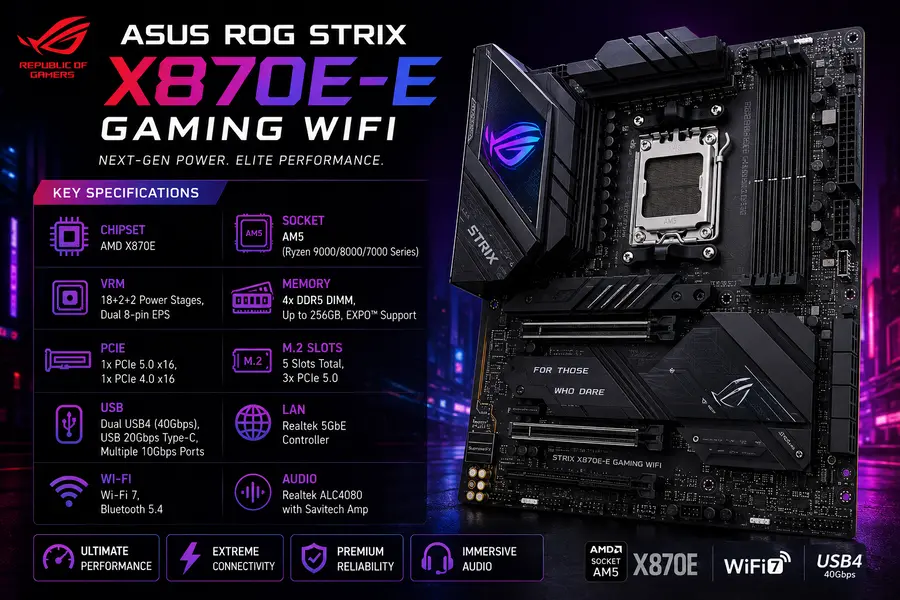
1. ASUS ROG Strix X870E-E Gaming WiFi
Overview
This is the board I’d point most enthusiast Linux builders toward if budget allows for the X870E tier. It’s not the most expensive Strix option, but it hits a sweet spot between overclocking headroom and everyday reliability, and ASUS has been consistent about shipping AGESA updates promptly.
Key Specifications
- Chipset: AMD X870E
- Socket: AM5 (Ryzen 9000/8000/7000 series)
- VRM: 18+2+2 power stages, dual 8-pin EPS
- Memory: 4x DDR5 DIMM, up to 256GB, EXPO support
- PCIe: 1x PCIe 5.0 x16, 1x PCIe 4.0 x16
- M.2: 5 slots total, 3x PCIe 5.0
- USB: Dual USB4 (40Gbps), USB 20Gbps Type-C, multiple 10Gbps ports
- LAN: Realtek 5GbE controller
- Wi-Fi: Wi-Fi 7, Bluetooth 5.4
- Audio: Realtek ALC4080 with Savitech amp
Linux Compatibility
The Realtek 5GbE controller on this board works cleanly with the r8126 driver on kernel 6.8 and newer — on older kernels you may need to wait for a distro update or use a DKMS package. Wi-Fi 7 support via the mt7925 or similar driver is solid on recent kernels. BIOS Flashback lets you update firmware before ever installing an OS, which is genuinely useful if you’re pairing this with a brand-new Ryzen 9000 chip. Suspend/resume has been reported as stable by most Fedora and Ubuntu users on current BIOS revisions.
Pros
- Excellent PCIe 5.0 lane allocation for both GPU and storage
- Strong VRM for sustained multi-core workloads (compiling, virtualization)
- Dual USB4 ports genuinely useful for external NVMe enclosures
Cons
- Priced at a premium relative to the performance most Linux users will actually use
- Five M.2 heatsinks make initial SSD installation a bit fiddly
Best For
Enthusiasts and developers who want a no-compromise X870E board and plan to keep it through multiple Ryzen generations.
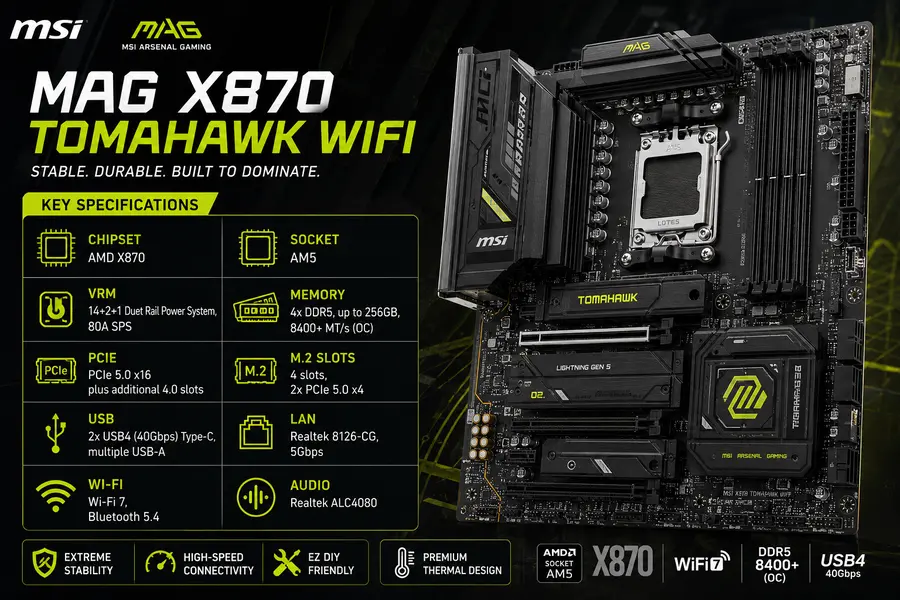
2. MSI MAG X870 Tomahawk WiFi
Overview
MSI’s Tomahawk line has quietly become one of the more Linux-friendly mid-range options on AM5, mostly because MSI’s UEFI has gotten less quirky over the last couple of BIOS cycles.
Key Specifications
- Chipset: AMD X870
- Socket: AM5
- VRM: 14+2+1 Duet Rail Power System, 80A SPS
- Memory: 4x DDR5, up to 256GB, 8400+ MT/s (OC)
- PCIe: PCIe 5.0 x16 plus additional 4.0 slots
- M.2: 4 slots, 2x PCIe 5.0 x4
- USB: 2x USB4 (40Gbps) Type-C, multiple USB-A
- LAN: Realtek 8126-CG, 5Gbps
- Wi-Fi: Wi-Fi 7, Bluetooth 5.4
- Audio: Realtek ALC4080
Linux Compatibility
The Realtek 8126-CG LAN controller needs a reasonably current kernel for full 5Gbps throughput, but once you’re on 6.9+ it’s rock solid. Wi-Fi 7 and audio work out of the box on any recent distro. One quirk worth knowing: the second Gen5 M.2 slot shares bandwidth with the USB4 ports, so if you populate that slot fully, expect the USB4 controller to drop to reduced bandwidth — this is a hardware lane-sharing limitation, not a Linux issue, but it’s worth planning around.
Pros
- Genuinely competitive pricing for the feature set
- 5Gbps LAN is faster than most competitors at this price point
- Strong thermal design (Frozr Guard heatsinks) keeps VRM temps in check
Cons
- M.2/USB4 bandwidth sharing catches some buyers off guard
- Only three PCIe expansion slots total
Best For
Builders who want X870 chipset features (PCIe 5.0 GPU + storage) without paying X870E prices.
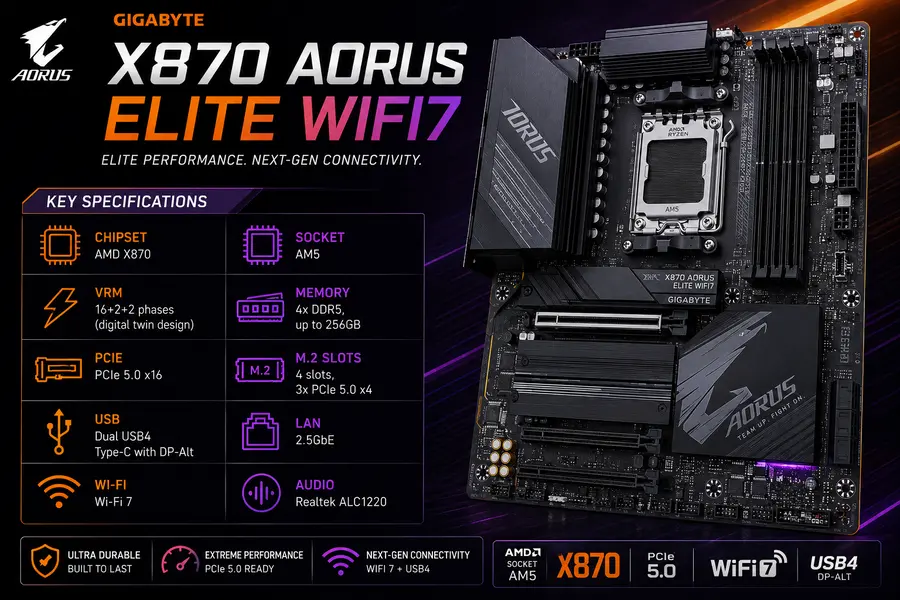
3. Gigabyte X870 AORUS Elite WiFi7
Overview
Gigabyte’s AORUS Elite series has been a dependable mid-tier pick for years, and the X870 version continues that trend. It’s not flashy, but it does everything competently.
Key Specifications
- Chipset: AMD X870
- Socket: AM5
- VRM: 16+2+2 phases (digital twin design)
- Memory: 4x DDR5, up to 256GB
- PCIe: PCIe 5.0 x16
- M.2: 4 slots, 3x PCIe 5.0 x4
- USB: Dual USB4 Type-C with DP-Alt
- LAN: 2.5GbE
- Wi-Fi: Wi-Fi 7
- Audio: Realtek ALC1220
Linux Compatibility
Gigabyte’s 2.5GbE controllers have long been well-supported through the r8125 in-kernel driver, and this board is no exception — plug and play on Ubuntu, Fedora, and Arch alike. The ALC1220 codec is one of the most Linux-tested audio chips on the market at this point, with zero configuration hassle. Gigabyte’s BIOS updates have been consistent, though slightly less frequent than ASUS’s cadence.
Pros
- Three Gen5 M.2 slots is unusually generous at this price
- Reliable networking with no known Linux quirks
- EZ-Latch tool-less M.2 installation
Cons
- 2.5GbE LAN, not 5GbE — a step down from the ASUS and MSI boards above
- Fewer rear USB ports than some competitors
Best For
Buyers who want maximum fast storage (three Gen5 M.2 slots) without paying for premium networking they may not use.
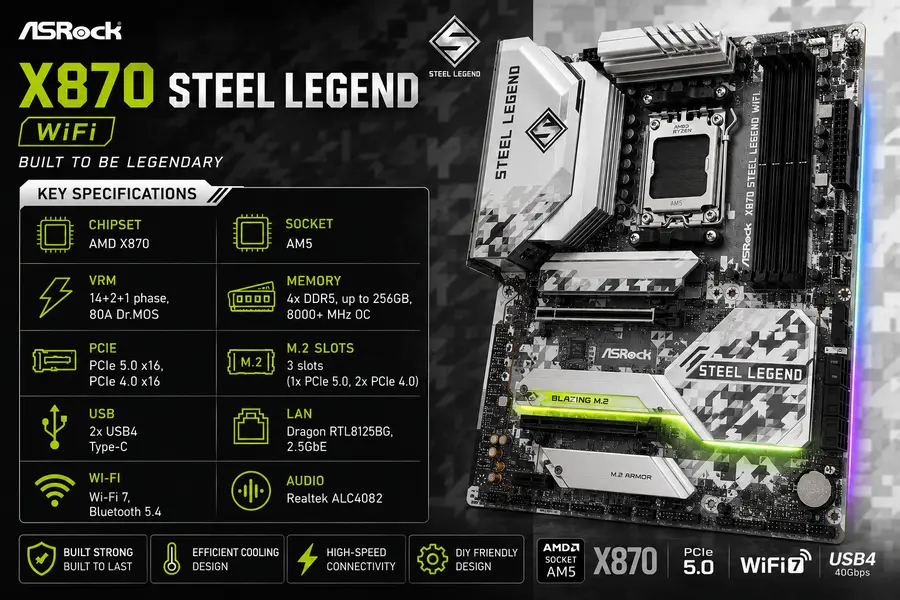
4. ASRock X870 Steel Legend WiFi
Overview
ASRock doesn’t always get enough credit in mainstream buying guides, but the Steel Legend series has a loyal following among Linux users specifically because ASRock’s BIOS is refreshingly straightforward — fewer proprietary “AI” overlays getting in the way of basic settings.
Key Specifications
- Chipset: AMD X870
- Socket: AM5
- VRM: 14+2+1 phase, 80A Dr.MOS
- Memory: 4x DDR5, up to 256GB, 8000+ MHz OC
- PCIe: PCIe 5.0 x16, PCIe 4.0 x16
- M.2: 3 slots (1x PCIe 5.0, 2x PCIe 4.0)
- USB: 2x USB4 Type-C
- LAN: Dragon RTL8125BG, 2.5GbE
- Wi-Fi: Wi-Fi 7, Bluetooth 5.4
- Audio: Realtek ALC4082
Linux Compatibility
The RTL8125BG LAN chip is a known quantity in the Linux community at this point — it’s been used across several ASRock generations and works flawlessly with the r8125 driver. BIOS Flashback via USB button is a standout feature for anyone setting up a headless server build, since you can update firmware before ever booting an OS. ASRock’s BIOS menus are also less cluttered than some competitors, making IOMMU and Secure Boot toggles easy to find.
Pros
- BIOS Flashback button makes firmware updates painless
- Clean, uncluttered UEFI — good for less experienced Linux builders
- Attractive white PCB option for aesthetic builds
Cons
- Only two PCIe expansion slots on the physical layout
- VRM is adequate but not class-leading for extreme overclocking
Best For
Linux users who want a hassle-free BIOS experience and don’t need the absolute fastest networking.
5. ASUS TUF Gaming B850-Plus WiFi
Overview
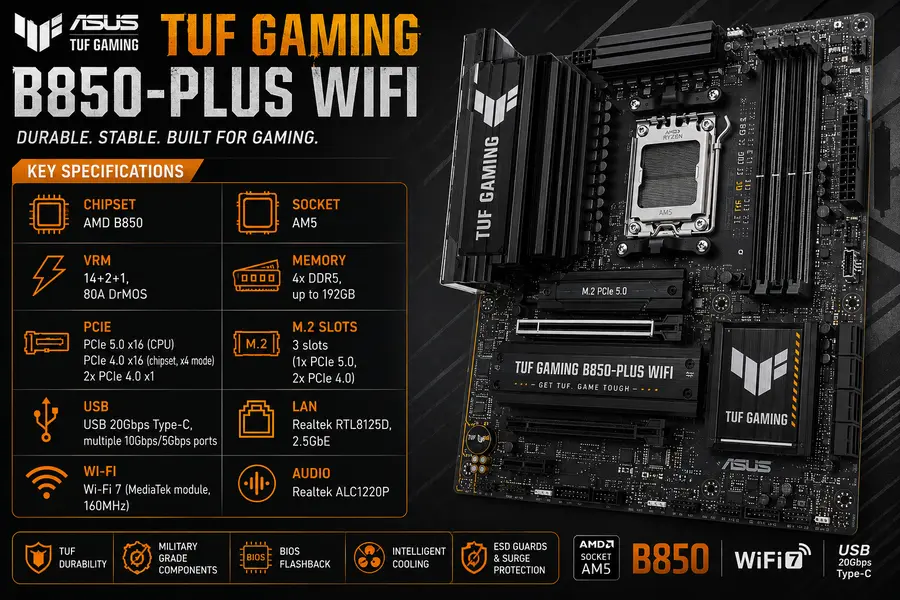
The TUF Gaming B850-Plus WiFi is where I point most people building a solid mainstream Linux desktop — gaming, dev work, general productivity — without spending X870E money.
Key Specifications
- Chipset: AMD B850
- Socket: AM5
- VRM: 14+2+1, 80A DrMOS
- Memory: 4x DDR5, up to 192GB
- PCIe: PCIe 5.0 x16 (CPU), PCIe 4.0 x16 (chipset, x4 mode), 2x PCIe 4.0 x1
- M.2: 3 slots (1x PCIe 5.0, 2x PCIe 4.0)
- USB: USB 20Gbps Type-C, multiple 10Gbps/5Gbps ports
- LAN: Realtek RTL8125D, 2.5GbE
- Wi-Fi: Wi-Fi 7 (MediaTek module, 160MHz)
- Audio: Realtek ALC1220P
Linux Compatibility
This is one of the most trouble-free B-series boards I’ve tested on Linux. The RTL8125D and MediaTek Wi-Fi module both have solid in-kernel driver support, and the ALC1220P audio codec needs zero manual configuration. One thing worth flagging: the MediaTek Wi-Fi 7 module here only supports 160MHz channel width rather than the full 320MHz some premium boards offer — not a Linux-specific limitation, just something to know before you buy for Wi-Fi speed reasons.
Pros
- Four PCIe expansion slots — unusual generosity at this price
- Reliable, well-tested Linux networking stack
- Genuinely solid VRM for a B-series board
Cons
- Wi-Fi 7 module capped at 160MHz, not the full 320MHz spec
- Only one PCIe 5.0 M.2 slot
Best For
Mainstream Linux desktop builders who want dependable performance without X870-tier spending.
6. MSI MAG B850 Tomahawk MAX WiFi
Overview
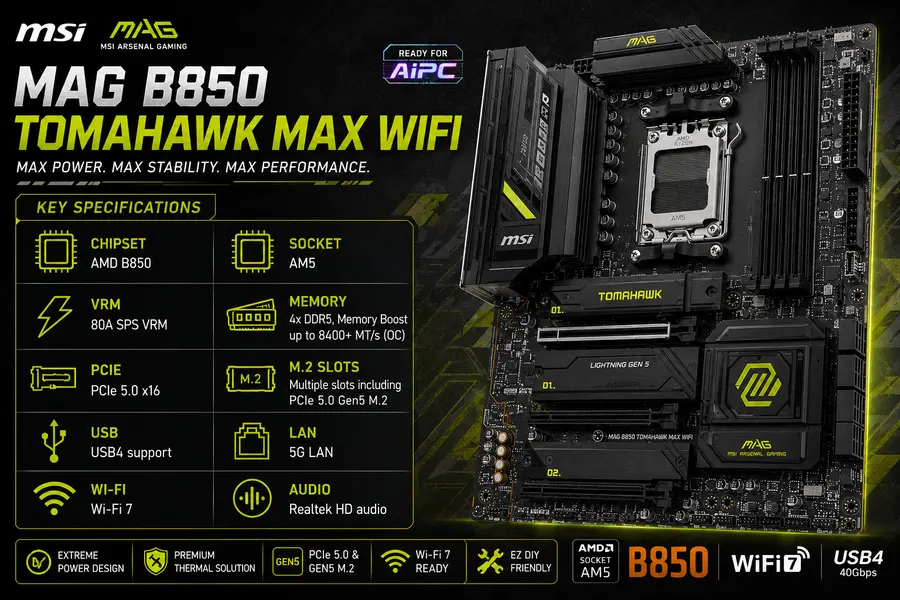
The “MAX” refresh of MSI’s B850 Tomahawk brought meaningful upgrades over the original launch board, and it’s become one of the better value picks in the B850 tier for anyone who still wants a PCIe 5.0 GPU slot.
Key Specifications
- Chipset: AMD B850
- Socket: AM5
- VRM: 80A SPS VRM
- Memory: 4x DDR5, Memory Boost up to 8400+ MT/s (OC)
- PCIe: PCIe 5.0 x16
- M.2: Multiple slots including PCIe 5.0 Gen5 M.2
- USB: USB4 support
- LAN: 5G LAN
- Wi-Fi: Wi-Fi 7
- Audio: Realtek HD audio
Linux Compatibility
This board benefits from the same driver maturity as its X870 sibling — the 5G LAN controller and Wi-Fi 7 module are both well-supported on kernel 6.9 and up. MSI’s newer “MAX” BIOS revisions have also improved UEFI stability across the board, with fewer reports of boot hangs that plagued some early X870/B850 launch firmware.
Pros
- 5G LAN is unusually fast for a B850-tier board
- PCIe 5.0 GPU slot despite the more affordable chipset
- Updated BIOS is noticeably more stable than launch-era firmware
Cons
- Fewer M.2 slots than the ASUS TUF B850-Plus
- MSI’s Center software ecosystem is Windows-only (irrelevant for Linux use, but worth knowing if you dual-boot)
Best For
Value-focused builders who want fast networking without stepping up to X870.
7. Gigabyte B850 AORUS Elite WiFi7
Overview
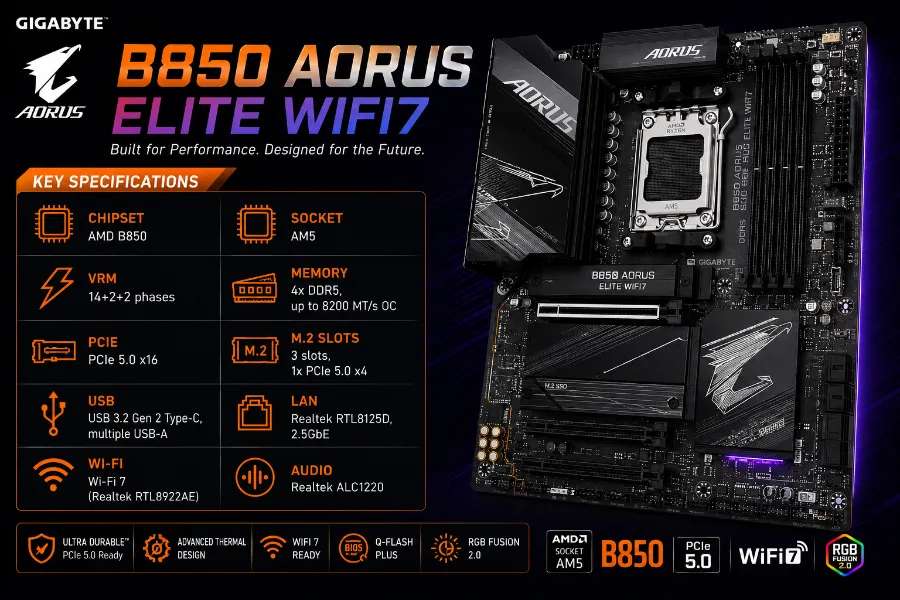
If you want a dependable everyday Linux desktop board and don’t need extreme storage or networking, this is a smart, no-drama pick.
Key Specifications
- Chipset: AMD B850
- Socket: AM5
- VRM: 14+2+2 phases
- Memory: 4x DDR5, up to 8200 MT/s OC
- PCIe: PCIe 5.0 x16
- M.2: 3 slots, 1x PCIe 5.0 x4
- USB: USB 3.2 Gen 2 Type-C, multiple USB-A
- LAN: Realtek RTL8125D, 2.5GbE
- Wi-Fi: Wi-Fi 7 (Realtek RTL8922AE)
- Audio: Realtek ALC1220
Linux Compatibility
Both the LAN and Wi-Fi controllers here are Realtek parts with mature Linux driver support — the RTL8922AE Wi-Fi 7 chip in particular has seen steady mainline kernel improvements. This is one of the more predictable boards on this list for anyone who wants to avoid hunting for out-of-tree kernel modules.
Pros
- Realtek networking stack throughout — consistent Linux behavior
- Good power delivery for a mainstream board
- EZ-Latch tool-less M.2 and PCIe design
Cons
- Only one Gen5 M.2 slot
- Audio jacks and rear I/O layout are a bit tight for cable management
Best For
Everyday desktop Linux users who value predictable, well-tested hardware over raw specs.
8. ASRock B850 Pro RS WiFi
Overview
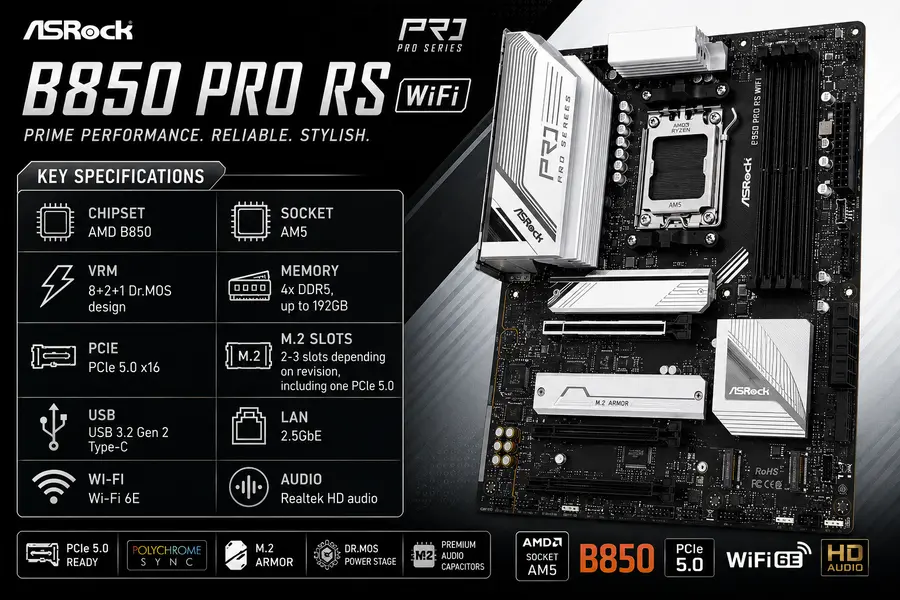
This is the budget pick on this list, and it earns its spot by not cutting corners on the things that actually matter for a Linux build — networking and firmware quality — while trimming extras that most users don’t need.
Key Specifications
- Chipset: AMD B850
- Socket: AM5
- VRM: 8+2+1 Dr.MOS design
- Memory: 4x DDR5, up to 192GB
- PCIe: PCIe 5.0 x16
- M.2: 2-3 slots depending on revision, including one PCIe 5.0
- USB: USB 3.2 Gen 2 Type-C
- LAN: 2.5GbE
- Wi-Fi: Wi-Fi 6E
- Audio: Realtek HD audio
Linux Compatibility
The 2.5GbE controller and Wi-Fi 6E module here are both older, well-established Linux hardware — this actually works in the board’s favor, since there’s a long track record of stable driver support rather than needing bleeding-edge kernel patches. ASRock’s straightforward BIOS layout also makes it easy to find the IOMMU and virtualization toggles without digging through gaming-oriented menus.
Pros
- Genuinely affordable while still offering PCIe 5.0 for the GPU slot
- Mature, well-tested Wi-Fi and LAN hardware
- Simple BIOS layout, good for first-time Linux builders
Cons
- Modest VRM limits sustained overclocking headroom
- Wi-Fi 6E instead of Wi-Fi 7
Best For
Budget builders and home lab tinkerers who want a reliable, no-frills AM5 foundation.
9. ASUS ProArt X870E Creator WiFi
Overview
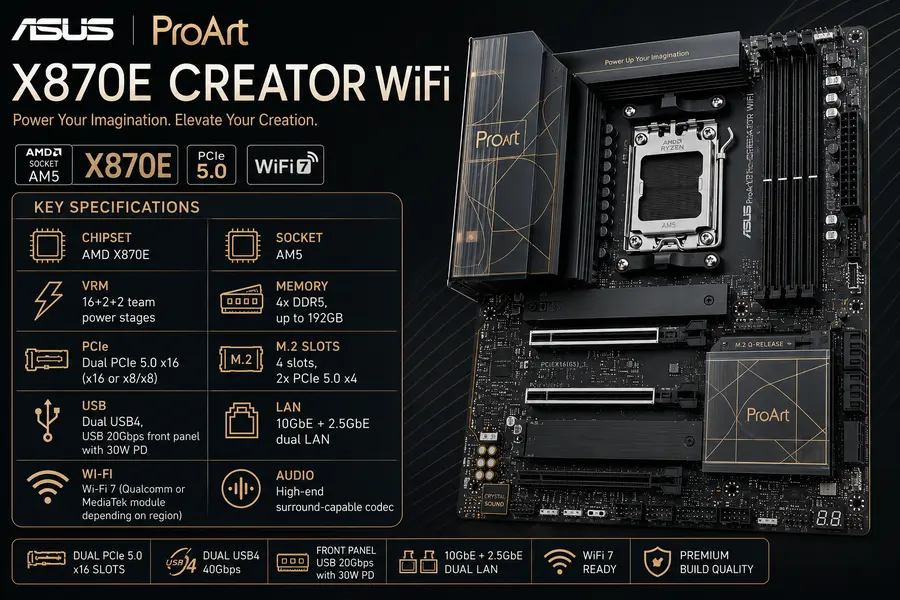
This is the board I recommend most often to Linux users doing content creation, virtualization, or home-lab work where fast, reliable dual networking actually matters day to day.
Key Specifications
- Chipset: AMD X870E
- Socket: AM5
- VRM: 16+2+2 team power stages
- Memory: 4x DDR5, up to 192GB
- PCIe: Dual PCIe 5.0 x16 (x16 or x8/x8)
- M.2: 4 slots, 2x PCIe 5.0 x4
- USB: Dual USB4, USB 20Gbps front panel with 30W PD
- LAN: 10GbE + 2.5GbE dual LAN
- Wi-Fi: Wi-Fi 7 (Qualcomm or MediaTek module depending on region)
- Audio: High-end surround-capable codec
Linux Compatibility
The 10GbE controller is the standout feature here, and it’s worth checking your specific distro’s kernel version before buying since 10GbE Realtek/Aquantia-class chips have historically needed slightly newer kernels for full-speed operation — current 6.9+ kernels handle it without issue. Dual PCIe 5.0 x16 slots are genuinely useful for GPU passthrough setups in a home lab, and IOMMU grouping on this board has been reported as clean by virtualization-focused Linux users.
Pros
- Dual 10GbE/2.5GbE LAN is rare at any price point, let alone this one
- Excellent PCIe lane layout for GPU passthrough and virtualization builds
- Professional, understated aesthetic if you care about that
Cons
- Premium pricing reflects the creator-focused feature set
- Overkill for a pure gaming build
Best For
Content creators, virtualization enthusiasts, and home-lab builders who need serious networking.
10. MSI MPG X870E Carbon MAX WiFi
Overview
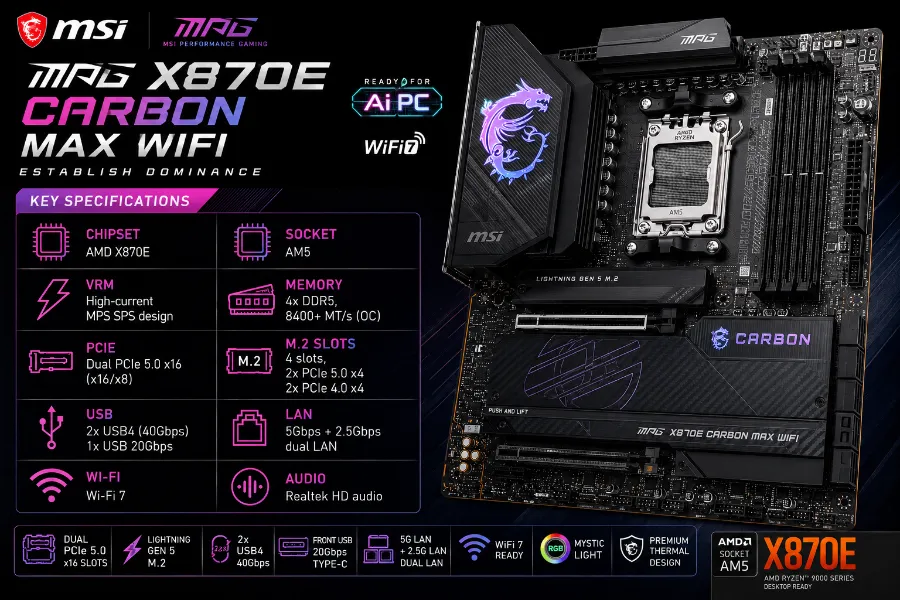
MSI’s “MAX” refresh of the Carbon series addressed several of the original board’s rough edges, and the result is one of the most well-rounded X870E boards currently available — genuinely competitive with ASUS and Gigabyte’s flagship offerings.
Key Specifications
- Chipset: AMD X870E
- Socket: AM5
- VRM: High-current MPS SPS design
- Memory: 4x DDR5, 8400+ MT/s (OC)
- PCIe: Dual PCIe 5.0 x16 (x16/x8)
- M.2: 4 slots, 2x PCIe 5.0 x4, 2x PCIe 4.0 x4
- USB: 2x USB4 (40Gbps), 1x USB 20Gbps
- LAN: 5Gbps + 2.5Gbps dual LAN
- Wi-Fi: Wi-Fi 7
- Audio: Realtek HD audio
Linux Compatibility
Dual LAN controllers both use mature Realtek silicon with solid in-kernel support. This board’s 64MB BIOS chip gives it broader CPU compatibility out of the box, which matters if you’re planning to run an older kernel that expects specific microcode. One caveat: the second Gen5 M.2 slot shares bandwidth with the USB4 controller, similar to the smaller Tomahawk board — plan your storage layout around that if USB4 throughput matters to you.
Pros
- Dual 5G/2.5G LAN is excellent for home server or NAS-adjacent builds
- Strong VRM handles flagship Ryzen 9000 chips without breaking a sweat
- 64MB BIOS chip gives generous CPU microcode headroom
Cons
- Bandwidth sharing between M.2 and USB4 requires planning
- Premium price puts it in direct competition with ASUS’s top Strix boards
Best For
Power users who want dual fast LAN plus flagship-tier CPU support in one board.
Best AMD Chipsets for Linux
B650 — The previous-generation mainstream chipset. Still widely available and perfectly capable for Linux use, but lacks native PCIe 5.0 support in most implementations. Good budget option if you find old stock at a discount, but not future-proof.
B850 — The current mainstream chipset. Adds PCIe 5.0 for the GPU slot and primary M.2, while keeping pricing reasonable. USB capability and lane count are more limited than X870/X870E, but for most desktop Linux users this is plenty. Upgrade path is solid through the rest of the AM5 socket’s lifespan.
X670 — Previous-generation high-end chipset, now largely phased out at retail in favor of X870/X870E. Worth considering only if you find serious discounts on remaining stock.
X870 — Current mid-high tier. Adds mandatory USB4 support and PCIe 5.0 across both GPU and primary storage. A meaningful step up from B850 in I/O flexibility without the full expense of X870E.
X870E — The flagship AM5 chipset. Two PCIe 5.0-capable hub connections mean more Gen5 lanes for multiple GPUs, storage, and expansion cards simultaneously. Best pick for virtualization, GPU passthrough, and workstation-class builds. Overkill for a simple desktop.
Who should buy which: gamers and everyday desktop users are well served by B850. Developers doing local builds, containers, or moderate virtualization should look at X870. Anyone running multiple GPUs, heavy PCIe expansion cards, or serious home-lab virtualization should go X870E.
Things to Check Before Buying
- CPU compatibility — Confirm your specific Ryzen model is supported at the BIOS version the board ships with; some newer chips need a firmware update before first boot.
- BIOS Flashback — Extremely useful if you’re buying a new CPU alongside an older board revision, since you can update firmware without installing a compatible processor first.
- Linux Wi-Fi compatibility — Check the exact Wi-Fi module (not just “Wi-Fi 7”) against your kernel version before buying if wireless matters to your build.
- Intel vs Realtek LAN — Both work well on Linux today; Realtek’s r8125/r8126 drivers are mainlined and mature, so don’t let older reputation concerns steer you away.
- Storage layout — Watch for shared PCIe bandwidth between M.2 slots and USB4/PCIe expansion slots, which is common across nearly every board in this price range.
- PCIe layout — Count physical expansion slots, not just M.2 count, if you plan to add capture cards, HBAs, or additional NICs.
- Memory support — Check the QVL (qualified vendor list) for your specific RAM kit, especially at higher DDR5 speeds.
- Kernel version — Cross-reference your distro’s shipped kernel against the board’s networking and Wi-Fi silicon before purchase.
- Future upgrades — AM5 is a long-lived socket; buying a board with headroom (X870/X870E) can extend its useful life by a CPU generation or two.
- Cooling — VRM heatsink size and chipset fan presence (or absence) matter more on X870E boards running flagship CPUs continuously.
- Budget — Don’t overspend on chipset tier if your actual workload is web browsing, office work, and light development — B850 covers that comfortably.
🎯 AMD Ryzen Motherboard Buying Guide (Quick Decision Guide)
Not sure which motherboard is right for your Linux PC? Use this buyer’s cheat sheet to quickly find the best motherboard based on your budget, workload, and future upgrade plans.
💰 Budget Builders
Save money without sacrificing Linux compatibility or networking reliability.
✔ Gigabyte B850 AORUS Elite WiFi7
🎮 Gaming PCs
Excellent PCIe expansion, VRM cooling and stable gaming performance.
✔ ASRock X870 Steel Legend WiFi
🎬 Content Creators
Ideal for video editing, large SSD arrays and fast file transfers.
💻 Programming & Docker
Perfect for compiling code, containers and daily multitasking.
✔ MSI MAG X870 Tomahawk WiFi
🖥️ Home Lab & GPU Passthrough
Strong IOMMU support with excellent PCIe expansion.
✔ MSI MPG X870E Carbon MAX WiFi
⚙️ Heavy Productivity
Premium VRMs and dual LAN for professional workloads.
🚀 Multiple Gen5 SSDs
Need blazing-fast NVMe storage? This is the one.
🌐 NAS & Home Server
Choose if networking speed matters more than RGB.
✔ MSI MPG X870E Carbon MAX (5GbE + 2.5GbE)
🔮 Best Long-Term Investment
Want your motherboard to support future Ryzen processors? Buy X870/X870E today.
⭐ Linuxano Expert Recommendation
If your budget allows, skip entry-level boards and invest in an X870 or X870E motherboard. The stronger VRMs, better BIOS support, faster networking, additional PCIe 5.0 lanes, and improved upgrade potential make them a smarter long-term investment for Linux users. AMD has committed to supporting the AM5 platform for years, meaning today’s motherboard could comfortably power your next Ryzen upgrade with nothing more than a BIOS update.
Official Resources
For the latest compatibility details, always cross-check manufacturer and community documentation directly:
- AMD Ryzen Compatibility
- Linux Kernel Documentation
- Ubuntu Hardware Certification
- Fedora Documentation
- Arch Linux Wiki
If you’re planning the rest of your build, it’s also worth reading through our guides on best Linux laptops, best Linux mini PCs, best Linux SSDs, best Linux Wi-Fi cards, and our AMD Ryzen Linux performance guide for pairing advice on GPUs — both AMD and NVIDIA.
Disclaimer: Motherboard availability, pricing, BIOS versions, and Linux kernel compatibility may change over time. Always verify the latest specifications and firmware updates from the manufacturer’s official website before making a purchase.
Conclusion
After going through specs, BIOS notes, and real-world Linux reports, the picture for the best Linux-compatible motherboards for AMD Ryzen in 2026 is genuinely encouraging. Nearly every board here works well out of the box on a current kernel, which wasn’t always true a couple of AM5 generations ago.
If money isn’t the deciding factor, the ASUS ProArt X870E Creator WiFi is my premium pick, thanks to its dual 10GbE/2.5GbE networking and clean virtualization support. For pure gaming, the ASRock X870 Steel Legend WiFi delivers a straightforward BIOS and dependable networking without breaking the bank. If value is your priority, the Gigabyte B850 AORUS Elite WiFi7 punches well above its price point. Anyone doing serious workstation tasks should look hard at the MSI MPG X870E Carbon MAX WiFi for its dual LAN and VRM headroom. And if you’re building on a tight budget, the ASRock B850 Pro RS WiFi proves you don’t need to overspend to get a stable Linux foundation.
My practical advice: match the chipset tier to your actual workload rather than chasing specs you won’t use, double-check your distro’s kernel version against the board’s networking and Wi-Fi silicon before buying, and always confirm the latest BIOS is available for your specific CPU. Get those three things right, and any board on this list will serve you well for years of Linux use.
About the Author