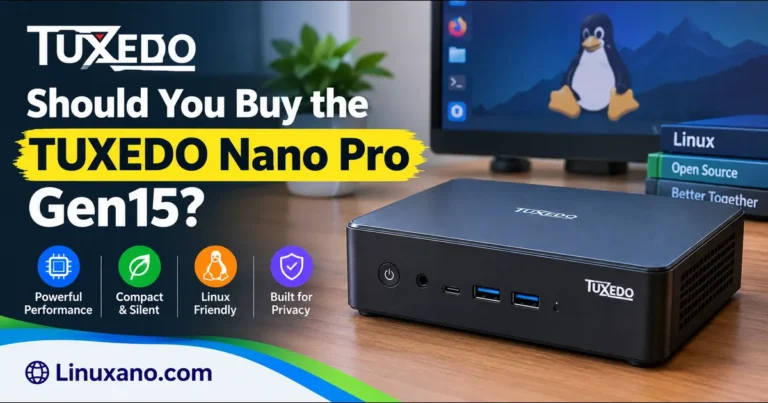
Should You Buy the TUXEDO Nano Pro Gen15?
TUXEDO Computers has launched a new tiny Linux desktop, and it comes with a bigger price tag than its predecessor. The Nano Pro Gen15 swaps AMD for Intel’s Core Ultra X7 358H, pushes the RAM ceiling to 128 GB, and adds a PCIe 5.0 SSD slot. It fits in a case about the size of a thick paperback.
It’s also in the preorder phase, with shipping reportedly planned for mid-November 2026. So the real question isn’t only whether the machine is good. It’s should you buy the TUXEDO Nano Pro Gen15 now, or wait for reviews?
No independent reviewer has tested it yet, and I haven’t either. This guide uses TUXEDO’s official specification page and launch coverage, and I’ll mark clearly what’s confirmed, what’s reasoned and what’s unknown. If you’re ordering from the US or elsewhere outside the EU, there’s a full section on shipping, duties and compatibility.
Key Takeaways
- Confirmed: 16-core Intel Core Ultra X7 358H, Arc B390 graphics, up to 128 GB upgradeable DDR5, PCIe 5.0 plus PCIe 4.0 SSD slots, dual 2.5GbE, Wi-Fi 7.
- Price: preorders start at €1,470 excluding VAT (about $1,650–$1,750 at recent exchange rates), before shipping and any import charges.
- Unknown: sustained performance, fan noise, real-world gaming and local-AI speeds.
- Best for: developers, home-lab builders, local-AI experimenters and Linux loyalists who want a repairable tiny PC.
- Poor fit: buyers who only need web and office work.
What the Nano Pro Gen15 Is
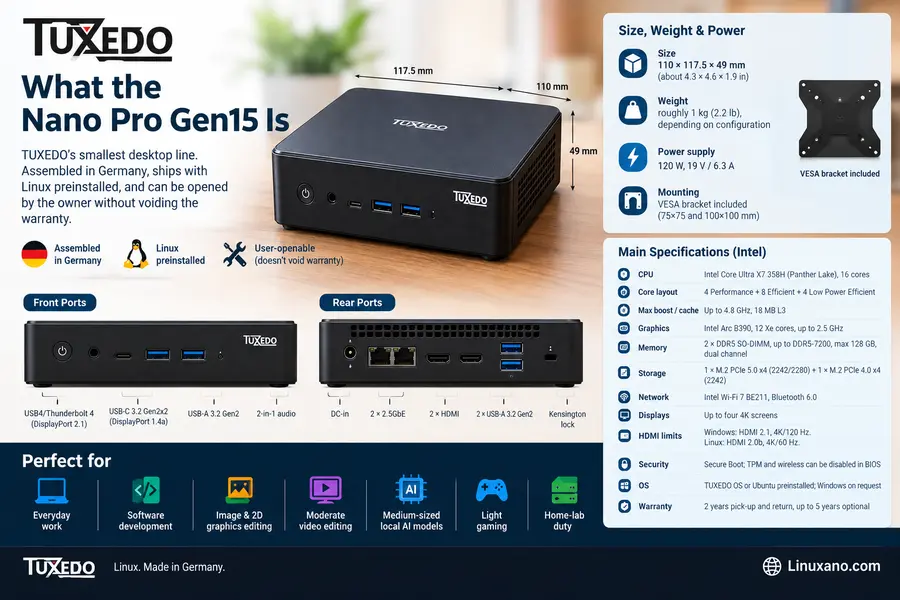
The Nano Pro is TUXEDO’s smallest desktop line. It’s assembled in Germany, ships with Linux preinstalled, and can be opened by the owner without voiding the warranty.
The Gen15 keeps the familiar body:
- Size: 110 × 117.5 × 49 mm (about 4.3 × 4.6 × 1.9 in)
- Weight: roughly 1 kg (2.2 lb), depending on configuration
- Power supply: 120 W, 19 V / 6.3 A
- Mounting: VESA bracket included (75×75 and 100×100 mm)
TUXEDO pitches it at everyday work, software development, image and 2D graphics editing, moderate video editing, medium-sized local AI models, light gaming and home-lab duty.
Official Specifications
| Component | TUXEDO Nano Pro Gen15 Intel |
|---|---|
| CPU | Intel Core Ultra X7 358H (Panther Lake), 16 cores |
| Core layout | 4 Performance + 8 Efficient + 4 Low Power Efficient |
| Max boost / cache | Up to 4.8 GHz, 18 MB L3 |
| Graphics | Intel Arc B390, 12 Xe cores, up to 2.5 GHz |
| Memory | 2 × DDR5 SO-DIMM, up to DDR5-7200, max 128 GB, dual channel |
| Storage | 1 × M.2 PCIe 5.0 x4 (2242/2280) + 1 × M.2 PCIe 4.0 x4 (2242) |
| Front ports | USB4/Thunderbolt 4 (DisplayPort 2.1), USB-C 3.2 Gen2x2 (DisplayPort 1.4a), USB-A 3.2 Gen2, 2-in-1 audio |
| Rear ports | 2 × USB-A 3.2 Gen2, 2 × HDMI, 2 × 2.5GbE, DC-in, Kensington lock |
| Network | Intel Wi-Fi 7 BE211, Bluetooth 6.0 |
| Displays | Up to four 4K screens |
| HDMI limits | Windows: HDMI 2.1, 4K/120 Hz. Linux: HDMI 2.0b, 4K/60 Hz |
| Security | Secure Boot; TPM and wireless can be disabled in BIOS |
| OS | TUXEDO OS or Ubuntu preinstalled; Windows on request |
| Warranty | 2 years pick-up and return, up to 5 years optional |
Gen15 vs. Gen14: What You Actually Gain
The Gen14 AMD model is still sold, and it’s the obvious cheaper alternative. These figures come from TUXEDO’s own product pages.
| Feature | Nano Pro Gen15 (Intel) | Nano Pro Gen14 (AMD) |
|---|---|---|
| CPU | Core Ultra X7 358H, 16 cores | Ryzen AI 5 340 (6 cores) or AI 7 350 (8 cores, 16 threads) |
| Integrated GPU | Arc B390, 12 Xe cores | Radeon 840M or 860M (up to 8 cores) |
| RAM | Up to 128 GB, DDR5-7200 | Up to 96 GB, DDR5-5600 |
| SSD slots | PCIe 5.0 x4 + PCIe 4.0 x4 | 2 × PCIe 4.0 x4 |
| Fast USB-C | 1 × USB4 + 1 × USB-C 3.2 Gen2x2 | 2 × USB4 |
| Ethernet | 2 × 2.5GbE | 1 × 1GbE + 1 × 2.5GbE |
| Wi-Fi / Bluetooth | Wi-Fi 7 / BT 6.0 | Wi-Fi 6E / BT 5.2 |
| Power adapter | 120 W | 90 W (AI 5) or 120 W (AI 7) |
| Starting price | From €1,470 excl. VAT | From about €840 at launch |
Two things stand out. The Gen15 has only one USB4 port, where the Gen14 has two, so dock-heavy users should note that. And neither model has full-size DisplayPort sockets, since both route DisplayPort through USB-C.
Overall, you pay roughly €600 or more for faster silicon, more memory headroom, faster storage and better networking. Whether that’s worth it depends on your workload, which the next sections cover.
Performance: What We Know and What We Don’t
What the hardware suggests
The 358H’s mix of 4 + 8 + 4 cores favors multithreaded jobs like compiling, rendering and running containers. Single-thread speed will come down to those four performance cores and the 4.8 GHz boost.
The unknown is cooling. This is a 0.6-liter chassis with one fan and a 120 W adapter. Laptop-class chips in tiny cases usually trade peak speed for sustained speed. TUXEDO says fan behavior can be tuned through its Control Center, but no one has published long-load data yet.
Graphics and gaming
TUXEDO says the Arc B390 handles older and less demanding games at Full HD with high settings. Heavier recent titles need lower settings and upscaling such as XeSS or FSR.
Read that literally. This is a capable integrated GPU, not a gaming rig. Indie games, older AAA titles and emulation are realistic. Brand-new blockbusters at high settings aren’t.
Local AI: the real selling point
Integrated graphics share system memory, so a Gen15 with 64 GB or 128 GB of RAM can load models that wouldn’t fit in a typical consumer graphics card’s video memory.
Here’s a back-of-envelope sanity check, which is my own reasoning rather than a TUXEDO claim. Dual-channel DDR5-7200 offers a theoretical peak bandwidth near 115 GB/s. Language-model speed is largely limited by how fast the weights can be read from memory. A 40 GB model could therefore generate only a few tokens per second at best, while smaller 7–14B models should feel much snappier.
That makes the Gen15 a strong choice for private, offline assistants and document processing. It won’t match a high-end GPU for raw speed. Wait for community benchmarks before paying extra for 128 GB.
Storage
A PCIe 5.0 SSD is fast on paper but costs more and runs hotter. For most buyers, a quality PCIe 4.0 drive is the better value. Reserve the Gen5 slot for large video projects or big datasets.
Ports, Displays and Home-Lab Appeal
The port layout is generous for the size:
- Thunderbolt 4 / USB4 for docks and fast external storage
- Three USB-A 3.2 Gen2 ports
- Two HDMI outputs plus DisplayPort over USB-C
- Dual 2.5GbE, which is rare in this size class
- Wi-Fi 7 and Bluetooth 6.0
It can run four 4K displays at once. The two Ethernet ports suit software routers, firewalls, Proxmox-style labs and small self-hosted servers.
One caution for Linux users with fast monitors: HDMI tops out at 4K/60 Hz. For 4K at higher refresh rates, you’ll need to use USB-C with DisplayPort.
Linux Support and the TUXEDO Ecosystem
TUXEDO’s pitch is that you buy a tested, supported package, not just parts.
- TUXEDO OS: KDE Plasma-based, installed and configured at the factory. Sources differ on whether it’s currently Ubuntu- or Debian-based, so confirm in the configurator.
- WebFAI: an installer that reinstalls your preferred distro the same way TUXEDO does, and doubles as recovery.
- Control Center: performance, power and fan profiles.
- Support: Linux-trained staff, plus GDPR-compliant servers in Germany.
- Encryption: optional full-disk encryption (not combinable with Windows dual-boot).
Drivers for the Arc B390 are in the Linux kernel and Mesa, according to TUXEDO. New Intel platforms generally work best on recent kernels, so if you install your own distro, pick a current release.
Upgradeability and Repair
Four screws in the feet release the base plate. Inside you can reach both RAM slots, both SSD slots and the Wi-Fi card, and clean the fan.
That’s a real advantage, because most mini PCs in this class solder their memory. It means you can buy 16 GB now and add more later. TUXEDO states that opening the device for upgrades won’t void the warranty, though damage from careless work and disassembling the cooling system aren’t covered.
Buying From the US or Outside the EU
This is where preorders get practical.
Estimated cost
The €1,470 starting price excludes taxes, duties and shipping. At recent exchange rates that’s roughly $1,650–$1,750. Rates move, so check the day you order.
For non-EU buyers:
- No German VAT. TUXEDO says customers outside the EU skip it, saving up to 19%.
- Shipping to the USA is €99, with no free-shipping threshold listed. (See TUXEDO’s shipping page for other countries.)
- Import charges are separate. Duties, taxes and fees are paid to local authorities, not TUXEDO, and can change. Check current US rules before ordering rather than assuming a number.
A conservative US budget is the configured price plus about €99 shipping plus a cushion for customs.
Details to confirm before you order
- Power cord: the package lists a German power cord. Plan to use a US cord or adapter, and ask support to confirm the power supply’s input voltage range.
- Warranty from abroad: TUXEDO advertises pick-up and return, but check how that works for US addresses.
- Return rights: TUXEDO’s revocation policy is built around European law. Ask what applies to you.
- Support hours: phone support runs weekdays on German time (9–13 and 14–17), so US callers should expect to use email.
- Payment: PayPal, Amazon Pay and credit cards are listed. A method with buyer protection is wise for a preorder.
Preorder Risk: How to Think About It
TUXEDO notes that delays can’t be ruled out for preorders and says it will inform customers of date changes. That’s honest, but it still carries risk.
What you’re taking on by ordering now:
- Date uncertainty. Mid-November is a target, not a guarantee.
- No independent validation. Thermals, noise and sustained speed are unproven.
- Early-batch quirks. BIOS or firmware updates are common in the first weeks of any new platform.
What you gain is a spot in the queue and the chance to configure before stock tightens. If you need the machine for a deadline, waiting is the safer move. If you’re curious and flexible, preordering is reasonable.
Who Should Buy the TUXEDO Nano Pro Gen15?
Is this compact Linux mini PC right for you? Compare your workload, performance expectations, and budget before deciding whether to buy, wait for reviews, or choose a more affordable alternative.
Buy Now If You Are
- A developer compiling large projects or running multiple containers.
- A home-lab builder who needs dual 2.5GbE networking in a tiny desktop.
- A privacy-conscious user interested in running AI models locally on their own hardware.
- A Linux enthusiast who values factory-tested hardware and owner-accessible components.
Wait for Reviews If You Are
- Planning long video renders or other sustained, CPU- or GPU-intensive workloads.
- Expecting 128 GB of RAM to guarantee fast inference with large AI models.
- Sensitive to fan noise and heat in a quiet home office or bedroom.
Skip It If You Are
- Mostly browsing the web, streaming videos, and handling routine office tasks.
- A serious gamer who wants high graphics settings in demanding new releases.
- Working with a firm budget below approximately $1,200.
Our verdict: The TUXEDO Nano Pro Gen15 makes the most sense for users who need powerful computing in a compact, Linux-focused system. Before buying, compare independent performance and noise tests, confirm your memory and storage requirements, and check the final price against your budget.
TUXEDO Nano Pro Gen15: Pros and Cons
The TUXEDO Nano Pro Gen15 combines modern Intel performance, expandable memory, and extensive connectivity in a compact Linux desktop. However, its launch price, limited USB4 connectivity, and lack of independent testing deserve consideration.
✓ Pros
- Modern 16-core Intel platform packed into a roughly 1 kg mini PC.
- Socketed and expandable RAM supporting up to 128 GB, which is uncommon in this class.
- Fast PCIe 5.0 and PCIe 4.0 SSD storage options.
- Dual 2.5GbE Ethernet, Wi-Fi 7, and Bluetooth 6.0 connectivity.
- Four-screw access and a repair-friendly warranty approach.
- Optional warranty coverage up to five years and Linux-trained customer support.
✗ Cons
- Launch pricing is roughly €600 or more above the previous Gen14 generation.
- Only one USB4 port is available.
- HDMI output is limited to 4K at 60 Hz under Linux.
- Independent thermal, fan-noise, and benchmark results are not yet available.
- Preorder and delivery dates could be delayed.
- Non-EU buyers face €99 shipping, possible customs charges, and a German power cord.
Bottom line: The TUXEDO Nano Pro Gen15 has an impressive hardware package for a compact Linux desktop, particularly for developers and home-lab users. However, the premium price and missing independent performance and noise tests make it worth waiting for real-world reviews before placing an order.
Smart Configuration Tips
- Use two identical RAM sticks. TUXEDO recommends dual-channel for full graphics performance.
- Match RAM to your job. 16 GB for light use, 32 GB for development, 64 GB or more only if local AI is the goal.
- Save on storage. A good Gen4 SSD beats an expensive Gen5 for most people. You can add a second drive later.
- Upgrade yourself later. Since modules are socketed, starting modest and adding RAM from a retailer may cost less than TUXEDO’s configurator prices. Compare before you buy.
- Consider the longer warranty if this will run as an always-on server.
Alternatives
- TUXEDO Nano Pro Gen14: the best value pick if you don’t need 128 GB or PCIe 5.0. See the official Gen14 page.
- US-based Linux vendors: companies like System76 sell Linux mini PCs with domestic shipping and simpler warranty handling.
- Generic mini PCs: often cheaper, but without TUXEDO’s Linux validation or repair policy.
- Small desktops with discrete GPUs: the better route for gaming and GPU-heavy work.
Compare RAM type, SSD slots, networking, warranty length and total landed cost, not just the sticker price.
Frequently Asked Questions
What CPU does the TUXEDO Nano Pro Gen15 use?
It uses the Intel Core Ultra X7 358H, a 16-core Panther Lake chip with up to 4.8 GHz boost and Intel Arc B390 graphics.
How much does the Nano Pro Gen15 cost in USD?
Preorders start at €1,470 excluding VAT, roughly $1,650–$1,750 at recent exchange rates, before shipping and customs.
Does TUXEDO ship the Nano Pro Gen15 to the USA?
Yes, TUXEDO lists shipping to the USA at €99, and import duties and taxes are paid separately to local authorities.
When will the Gen15 ship?
Launch coverage points to mid-November 2026, but TUXEDO warns that preorder dates can change.
How much RAM can I install?
Up to 128 GB of dual-channel DDR5 across two SO-DIMM slots, with speeds up to DDR5-7200.
Can it run local AI models?
Yes, TUXEDO promotes tools like LM Studio, and large shared memory lets it load bigger models, though speed depends on memory bandwidth.
Does it support four monitors?
Yes, it can drive up to four 4K displays, but HDMI is limited to 4K at 60 Hz under Linux.
Can I upgrade it myself without losing the warranty?
Yes, removing four screws exposes the RAM, SSDs and Wi-Fi card, and TUXEDO says careful upgrades don’t void the warranty.
Does it work with Windows?
TUXEDO installs Windows on request, alone or alongside Linux, but not in combination with full-disk encryption.
Is it better than the Gen14?
It has more power, memory and network speed, but the Gen14 costs far less and is enough for most everyday users.
Final Verdict: Should You Buy the TUXEDO Nano Pro Gen15?
So, should you buy the TUXEDO Nano Pro Gen15? If you want a tiny, repairable Linux machine with serious memory headroom and dual 2.5GbE, and you’re comfortable preordering before reviews arrive, yes, it looks like one of the most capable options in its class. The socketed RAM, the PCIe 5.0 slot and TUXEDO’s Linux support are genuine strengths.
If your needs are lighter, buy the Gen14 and keep the savings. If you’re cautious or you need guaranteed performance for demanding work, wait for independent thermal and benchmark results, then order. Either way, check the live configurator on the official TUXEDO Nano Pro Gen15 page and read Linuxiac’s launch report before you pay.
Disclaimer: This article is for informational purposes only and reflects manufacturer data and press coverage as of October 30, 2026. It is based on a preorder-stage product and has not been hands-on tested. Specifications, prices, exchange rates, customs rules and shipping dates can change, and USD figures are rough estimates. Confirm all details with TUXEDO Computers and your local customs authority before purchasing. This is not financial advice.
Buying a PC for Linux? Check These First
Before buying a Linux PC, mini PC, or upgrading your hardware, check driver support, component compatibility, and motherboard firmware. These practical guides can help you avoid common Linux hardware problems.
Real Linux Driver Support Data for Modern PC Hardware
Explore modern AMD, Intel, and NVIDIA hardware support, graphics drivers, firmware, and Linux compatibility.
Check Driver Support →The Linux PC Hardware Checklist
Review Wi-Fi, GPU, BIOS, drivers, and other essential components before purchasing or building a Linux PC.
View the Checklist →How to Check Motherboard Linux Compatibility Before Buying
Learn what to check about motherboard chipsets, onboard controllers, networking, and firmware before choosing your hardware.
Check Compatibility →More practical Linux hardware advice from Linuxano.com.
About the Author