Best USB Audio Interfaces for Linux
If you’ve ever shopped for an audio interface as a Linux user, you know the frustration. Every manufacturer’s website talks about Windows drivers and macOS compatibility, and Linux gets a single line buried in the FAQ, if it’s mentioned at all. That’s exactly why this guide exists. I’ve spent time going through real-world Linux testing data, community reports from ALSA and PipeWire users, and current August 2026 pricing to put together a list you can actually trust when picking the best USB audio interfaces for Linux.
The good news is that 2026 is a genuinely great year to be recording on Linux. Nearly every interface worth buying now uses USB Audio Class 2.0, which means it talks directly to the Linux kernel’s snd-usb-audio driver with zero proprietary software required. Plug it in, and PipeWire or ALSA sees it immediately. No hunting for third-party drivers, no dual-booting into Windows just to record a podcast.
That said, “class-compliant” doesn’t mean every interface behaves the same way once it’s connected. Firmware quality still varies a lot, and that shows up in real round-trip latency, XRun stability, and how well an interface holds up during a long tracking session. I’ll walk through what actually matters, then break down the interfaces worth your money right now.
Why Linux Compatibility Isn’t as Simple as “It Just Works”
USB Audio Class 2.0 (UAC2) is the real hero here. It’s an industry standard that lets an interface expose its inputs, outputs, sample rates, and bit depths without any vendor-specific driver. Linux has supported UAC2 natively for years through ALSA, and PipeWire (which has basically replaced JACK and PulseAudio as the default audio server on most modern distros) builds on top of that same kernel-level support, as detailed in the PipeWire ALSA compatibility documentation.
But there’s a catch worth understanding before you buy anything. Two interfaces can both be “class-compliant” and still behave very differently in practice. The firmware inside each device controls things like:
- Whether it uses implicit or explicit (async) USB feedback for clocking
- How it handles isochronous polling from the host
- Its actual ADC/DAC conversion latency, separate from whatever buffer size you set
- How gracefully it recovers from a dropped USB frame
This is why some budget interfaces get a reputation for glitchiness on Linux even though they technically work, while others from the same price bracket run rock solid for hours. A recent independent round-trip latency benchmark from Linux DJ tested ten popular interfaces on Ubuntu Studio using PipeWire 1.6, measuring actual round-trip latency rather than the theoretical numbers printed on spec sheets. The spread between the best and worst performer was only about 2.3 milliseconds at a 128-sample buffer, which tells you two things: modern interfaces have gotten genuinely good on Linux, and the differences that do exist are usually about consistency and headroom rather than raw speed.
What to Look For Before You Buy
A few things matter more than others when you’re shopping specifically as a Linux user.
Confirm UAC2 compliance, not just “USB audio.” Nearly everything sold today qualifies, but older discontinued models or oddball budget brands sometimes still require Windows-only drivers. If a product page never mentions Linux and only lists Windows/Mac driver downloads, dig into community forums like the Linux Audio subreddit, the PipeWire GitHub issues page, or KVR Audio before buying.
Check phantom power behavior. Some budget interfaces send 48V phantom power to every mic input simultaneously rather than per-channel. This isn’t a Linux-specific issue, but it catches a lot of new buyers off guard when they try to mix a condenser mic with a dynamic mic like a Shure SM7B on the same session.
Look at USB bus behavior, not just USB version. Nearly every pro-grade interface still runs USB 2.0 Audio Class protocols even when the physical connector is USB-C or plugged into a USB 3.0 port. What actually matters for stability is whether your motherboard’s USB controller handles isochronous transfers cleanly. Desktop front-panel headers and cheap hubs are common sources of dropouts; a rear panel port wired directly to the board is usually your safest bet.
Don’t ignore preamp quality just because you’re focused on drivers. Once you know an interface will work reliably on your distro, the preamps, converters, and headphone amp are what actually shape your recordings.
Best USB Audio Interfaces for Linux in 2026 — Top Picks
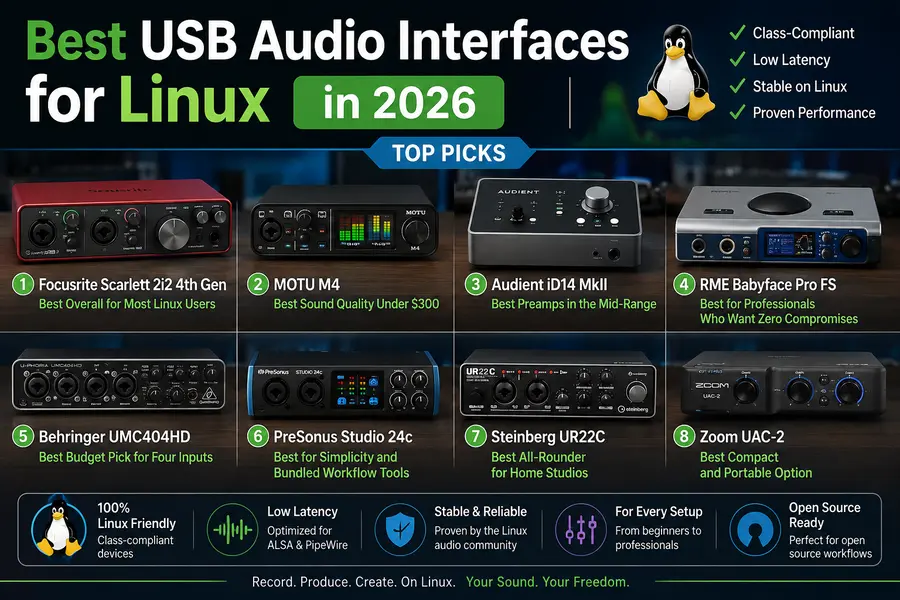
Focusrite Scarlett 2i2 4th Gen
Best Overall USB Audio Interface for Most Linux Users
A dependable plug-and-play choice for Linux home studios, with excellent class-compliant support, two versatile inputs and useful hardware-level features that do not depend on Windows or macOS software.
Why It Works So Well on Linux
The Focusrite Scarlett 2i2 has been one of the most popular home-studio audio interfaces for years, and the 4th Gen model remains an excellent choice for Linux users.
It appears as a standard class-compliant USB audio device, which means Linux can recognize it through ALSA and PipeWire without proprietary drivers or complicated setup.
Its two combo XLR/TRS inputs are well suited to vocals, guitars, microphones and line-level sources, making the Scarlett 2i2 a strong fit for solo musicians, podcasters and small home studios.
The 4th Gen model also adds Auto Gain and Clip Safe. These features are especially valuable for Linux users because their core functionality is handled by the interface itself rather than depending entirely on Focusrite’s Windows or macOS software.
Pros
- Rock-solid class-compliant recognition across PipeWire and ALSA
- Auto Gain and Clip Safe provide useful hardware-level functionality
- Compact desktop footprint with a durable metal chassis
- Large user base and plenty of community documentation for Linux setups
- Strong resale value compared with many lesser-known interfaces
Cons
- Only two inputs, making it unsuitable for recording a full band at once
- Headphone output may be underpowered for demanding high-impedance headphones
- Much of the bundled Windows and macOS software has limited value for Linux users
MOTU M4
Best USB Audio Interface for Sound Quality Under $300
One of the strongest choices for Linux users who care about converter quality, low latency and dependable class-compliant operation without relying heavily on proprietary control software.
Why It Stands Out on Linux
The MOTU M4 has developed a strong reputation among Linux and open-source audio users, largely because it combines high-quality conversion with straightforward class-compliant USB operation.
Its ESS Sabre converters deliver clean, detailed playback and recording, making the M4 particularly attractive for users who spend most of their time mixing or producing inside Linux DAWs such as Ardour, REAPER or Bitwig Studio.
The front-panel LED meters are another practical advantage. They provide immediate visual feedback for input and output levels without requiring a proprietary mixer application running in the background.
Hardware loopback is also useful for streaming, screen recording and podcast workflows. On Linux, where manufacturer-specific routing tools may not always be available, having important functionality handled directly by the interface is a major benefit.
Pros
- ESS Sabre converters deliver excellent clarity for the price
- Hardware loopback reduces dependence on proprietary routing software
- Very low fixed-latency overhead makes it attractive for Linux recording and monitoring workflows
- Front-panel metering provides useful real-time level information
- Sturdy all-metal enclosure feels built for long-term studio use
Cons
- Headphone output may struggle with particularly demanding planar or high-impedance headphones
- Only one dedicated guitar-ready Hi-Z input despite the four-input layout
- No extensive onboard mixer or DSP controls for complex hardware-only routing
- Some monitoring workflows may require extra PipeWire routing on Linux
Audient iD14 MkII
Best Mid-Range USB Audio Interface for Preamps on Linux
A premium two-channel interface for Linux users who care more about microphone preamp quality, clean recordings and future expansion than getting the lowest possible price.
Why It Stands Out on Linux
The Audient iD14 MkII is one of the strongest choices in the mid-range if microphone preamp quality matters more to you than having a long feature list.
Audient uses a preamp design derived from the topology found in its larger studio consoles, helping the iD14 deliver clean vocals, acoustic instruments and spoken-word recordings with very little unwanted noise.
Guitar and bass players also get a dedicated JFET instrument input. Its slightly warmer response can work particularly well with Linux amp-simulation workflows using software such as Guitarix or Neural Amp Modeler.
The other major advantage is ADAT expansion. While the iD14 starts as a compact desktop interface, an external ADAT-equipped preamp can significantly expand your recording setup later without forcing you to replace the interface itself.
Pros
- Console-derived Class-A preamps deliver clean recordings with a very low noise floor
- ADAT expansion gives you a practical upgrade path for larger recording sessions
- JFET instrument input works well for guitar and bass recording
- Large tactile monitor control makes desktop volume adjustment fast and intuitive
- Stable class-compliant operation makes it a strong fit for modern Linux audio setups
Cons
- More expensive than many competing two-input USB audio interfaces
- Desktop-only design will not suit users building a rack-based studio
- No dedicated talkback microphone like Audient’s higher-end iD44
- Some advanced control features may be easier to manage on officially supported operating systems
RME Babyface Pro FS
Best Professional USB Audio Interface for Linux Users Who Want Zero Compromises
A premium interface for serious Linux recording, mixing and production workflows where ultra-low latency, dependable firmware, flexible hardware routing and long-term reliability matter more than price.
Why Professionals Choose It for Linux
RME has built one of the strongest reputations in professional audio for dependable USB firmware and consistently low latency, and the Babyface Pro FS brings those strengths into a compact desktop interface.
Independent latency testing has repeatedly placed RME interfaces among the strongest performers in their class, with very low round-trip latency and minimal fixed overhead beyond the selected audio buffer.
That makes the Babyface Pro FS particularly appealing for Linux users who record through software instruments, amp simulators, real-time effects or monitoring chains where every millisecond matters.
The SteadyClock FS clocking system and RME’s hardware-based routing architecture also make the interface much less dependent on manufacturer software during day-to-day use.
For professionals who would rather spend their time recording than diagnosing USB audio glitches, the Babyface Pro FS is one of the most confidence-inspiring interfaces available.
Pros
- Outstanding round-trip latency performance compared with many competing USB interfaces
- Hardware-based routing and monitoring reduce dependence on software during recording
- SteadyClock FS provides highly stable clocking for demanding professional sessions
- Bus-powered design is remarkably compact considering the available analog and digital I/O
- Excellent reputation for long-term firmware support and hardware reliability
- Well suited to low-latency software instruments, amp simulation and real-time processing
Cons
- Very expensive compared with mainstream two-channel and four-channel USB interfaces
- Limited physical analog inputs compared with similarly priced rackmount interfaces
- Advanced routing capabilities can be unnecessary for simple home-recording setups
- Full access to every manufacturer-specific control feature may require more setup on Linux
Behringer UMC404HD
Best Budget Four-Input USB Audio Interface for Linux
One of the best-value Linux audio interfaces for users who need four simultaneous microphone inputs without paying mid-range prices. It is not the lowest-latency option here, but its channel count and simple class-compliant operation make it exceptionally useful for budget studios.
Why It Makes Sense for Budget Linux Studios
The Behringer UMC404HD remains one of the easiest ways to get four simultaneous microphone inputs into a Linux recording setup without spending several hundred dollars.
Its class-compliant USB implementation means modern distributions such as Ubuntu and Fedora can generally recognize the interface through the standard Linux audio stack without requiring proprietary driver installation.
The four MIDAS-designed microphone preamps give the UMC404HD a major advantage over similarly priced two-input interfaces. That extra I/O makes it practical for multi-person podcasts, rehearsal recordings, drum overheads and simple full-band demos.
The compromise is performance at extremely aggressive buffer settings. Compared with more expensive interfaces, the UMC404HD can require a slightly larger buffer to maintain consistently clean playback and recording. For podcasting, editing and most conventional studio work, that tradeoff is unlikely to be a serious limitation.
Pros
- Four MIDAS-designed microphone preamps at a very aggressive price
- Class-compliant USB operation keeps Linux setup straightforward
- Four simultaneous inputs work well for multi-guest podcasts and small recording sessions
- Rugged metal enclosure feels more substantial than many entry-level interfaces
- Excellent channel-per-dollar value for budget-conscious Linux users
Cons
- All four microphone channels share a single 48V phantom-power switch
- May require slightly larger buffer settings than premium interfaces for glitch-free operation
- Preamp noise performance is not as refined as higher-end Audient or RME interfaces
- Not the best choice for ultra-low-latency software monitoring or demanding live-processing workflows
PreSonus Studio 24c
Best Simple USB Audio Interface for Linux With MIDI I/O
A straightforward choice for Linux users who want dependable class-compliant operation, two versatile inputs and built-in MIDI connectivity without paying for features they may never use.
Why It Works Well for Simple Linux Setups
The PreSonus Studio 24c keeps the hardware formula simple: two combo microphone and line inputs, MIDI connectivity and a compact metal enclosure that fits easily into a home studio or portable recording setup.
For Linux users, one of its biggest advantages is predictability. The interface operates as a standard class-compliant USB audio device, making it a natural fit for common ALSA and PipeWire configurations without requiring proprietary drivers.
The inclusion of MIDI input and output also gives the Studio 24c an advantage for musicians using external synthesizers, drum machines or MIDI controllers alongside a Linux DAW.
PreSonus bundles Studio One for supported operating systems, but the core hardware does not depend on that software for normal recording and playback. Linux users can instead pair the Studio 24c with applications such as Ardour or REAPER.
Pros
- Straightforward class-compliant USB operation makes Linux setup simple
- Built-in MIDI input and output are useful for hardware synths and external MIDI gear
- Compact and lightweight enough for mobile recording or travel
- Solid microphone preamps for an interface in this price range
- Core recording functions do not depend on PreSonus desktop software
Cons
- Instrument-input controls can be less obvious for first-time users
- Headphone output is not especially powerful compared with some competitors
- Two-input design limits multi-microphone and larger recording sessions
- Bundled Studio One software is not natively available for Linux
Steinberg UR22C
Best All-Round USB Audio Interface for Linux Home Studios
A well-balanced choice for Linux home studios that need low latency, MIDI connectivity, direct monitoring and high-resolution recording without moving into premium-interface pricing.
Why It Works as a Linux Home-Studio All-Rounder
The Steinberg UR22C combines the features most small home studios actually need in one compact interface: microphone and instrument recording, MIDI connectivity, direct monitoring and support for high-resolution audio.
For Linux users, its class-compliant operation is particularly useful. The interface can handle core recording and playback duties without requiring proprietary USB audio drivers, making it a practical fit for modern ALSA and PipeWire-based systems.
The UR22C supports audio resolutions up to 32-bit/192kHz, although most Linux recording workflows will rarely need to run at the maximum setting. More important in everyday use is its strong latency performance for an interface in this price range.
Steinberg’s dspMixFx software and onboard DSP effects are designed for officially supported operating systems rather than native Linux use. However, the physical direct-monitoring controls still provide the essential benefit of hearing incoming signals without routing them through the DAW first.
Pros
- Strong latency performance for an interface in this price range
- Supports recording resolutions up to 32-bit/192kHz
- Hardware direct monitoring works without relying on proprietary mixer software
- Built-in MIDI input and output are useful for synths, drum machines and controllers
- Rugged metal construction suits both desktop and portable studio use
Cons
- Steinberg’s dspMixFx control software and DSP workflow are not natively available on Linux
- Linux users do not get the full onboard-effects experience offered on supported platforms
- Two-input layout limits larger multi-microphone recording sessions
- Industrial design feels less modern than newer Scarlett and MOTU alternatives
Zoom UAC-2
Best Compact USB Audio Interface for Linux Laptop Recording
A strong portable choice for Linux musicians and creators who want a compact, bus-powered two-input interface with straightforward controls and minimal setup complexity.
Why It Works Well for Portable Linux Recording
Zoom built much of its reputation around portable recording hardware, and the UAC-2 follows the same compact, travel-friendly philosophy. It takes up very little desk or bag space and can run directly from USB power, making it especially convenient for laptop-based Linux rigs.
For Linux users, the appeal is simplicity. In class-compliant operation, the UAC-2 can handle the core recording and playback duties expected from a two-channel USB audio interface without requiring a complicated proprietary driver stack.
Its two-input layout is enough for common mobile-recording jobs such as capturing vocals and guitar, recording a stereo source or working with a pair of microphones away from a permanent studio.
The controls are intentionally straightforward, which makes the UAC-2 a useful secondary interface for a Linux laptop or a practical main unit for users who simply need one or two inputs and do not require a larger studio routing setup.
Pros
- Compact and lightweight design works especially well for Linux laptop rigs
- Bus-powered operation means one less power adapter to carry
- Straightforward class-compliant workflow keeps setup relatively simple
- Simple physical controls are easy to understand during mobile recording
- Durable metal enclosure makes it better suited to travel than many plastic entry-level interfaces
Cons
- Two-input design limits larger multi-microphone recording sessions
- No MIDI I/O for users connecting hardware synths or older MIDI equipment
- Small gain controls are less precise than the larger knobs found on desktop-focused interfaces
- Less suitable for studios that expect to expand into more complex I/O and routing
Comparison Table: Best USB Audio Interfaces for Linux (August 2026)
| Interface | Price (USD) | Inputs/Outputs | Max Resolution | Linux Driver Type | Best For |
|---|---|---|---|---|---|
| Focusrite Scarlett 2i2 4th Gen | $224.99 | 2 in / 2 out | 24-bit/192kHz | Class-compliant (UAC2) | Best overall for most users |
| MOTU M4 | $269.95 | 4 in / 4 out | 24-bit/192kHz | Class-compliant (UAC2) | Best converter quality under $300 |
| Audient iD14 MkII | $399 | 2 in / 4 out + ADAT | 24-bit/96kHz | Class-compliant (UAC2) | Best preamps, mid-range |
| RME Babyface Pro FS | $999 | 4 in / 6 out | 24-bit/192kHz | Class-compliant (UAC2) | Best latency, pro reliability |
| Behringer UMC404HD | $139 | 4 in / 4 out | 24-bit/192kHz | Class-compliant (UAC2) | Best budget 4-input |
| PreSonus Studio 24c | $149.99 | 2 in / 2 out + MIDI | 24-bit/192kHz | Class-compliant (UAC2) | Simplicity and value |
| Steinberg UR22C | $169.99 | 2 in / 2 out + MIDI | 32-bit/192kHz | Class-compliant (UAC2) | Best headroom for the price |
| Zoom UAC-2 | $169.99 | 2 in / 2 out | 24-bit/192kHz | Class-compliant (UAC2) | Best for portability |
Setting Up Your Interface on Linux: Quick Tips
Once your interface arrives, getting it running is usually painless, but a few habits make it more reliable long-term.
- Plug into a rear-panel USB port on desktop systems rather than a front-panel header or hub, since those sometimes share a controller with other high-bandwidth devices.
- Disable USB autosuspend if you notice random dropouts during long sessions; this is a common, easily fixed culprit.
- If you’re chasing very low latency, start at a 128-sample buffer in PipeWire or JACK and only increase it if you hear crackling or see XRuns in your DAW’s status bar.
- Use
lsusb -tto confirm your interface is recognized and check which USB controller it’s attached to if you’re troubleshooting instability. - If you run into edge cases, the ArchWiki PipeWire troubleshooting page is one of the most actively maintained community references for diagnosing audio server issues, regardless of which distro you’re actually running.
Final Thoughts
Choosing among the best USB audio interfaces for Linux in 2026 really comes down to matching your budget to your workflow rather than worrying about compatibility, since nearly every serious option on the market today is fully class-compliant out of the box. If you’re just getting started, the Scarlett 2i2 or MOTU M4 will cover you without any surprises. If you need more inputs on a tight budget, the Behringer UMC404HD remains hard to beat. And if you’ve outgrown your current setup and want the most dependable, lowest-latency option money can buy, the RME Babyface Pro FS is still the interface Linux audio professionals reach for first.
Whichever one you pick, the days of fighting drivers on Linux are largely behind us. Plug it in, open your DAW, and get back to actually making something.
Frequently Asked Questions
Do USB audio interfaces work natively on Linux without drivers?
Yes, virtually all modern interfaces are USB Audio Class 2.0 compliant, meaning Linux recognizes them automatically through the built-in snd-usb-audio kernel driver with no extra software needed.
Which USB audio interface has the lowest latency on Linux?
Independent Linux benchmarking consistently shows the RME Babyface Pro FS delivering the lowest measured round-trip latency among current interfaces, though the gap to competitors like the MOTU M4 is small.
Is PipeWire or JACK better for using an audio interface on Linux?
PipeWire has largely replaced JACK as the default on most modern distros and now offers comparable low-latency performance with easier setup, though JACK is still preferred by some users for complex routing.
Can I use a Behringer or Focusrite interface on Ubuntu without installing anything?
Yes, both brands’ current-generation interfaces are class-compliant and will be detected automatically by Ubuntu’s audio stack the moment you plug them in.
What’s the difference between class-compliant and driver-based audio interfaces?
Class-compliant interfaces follow the USB Audio Class standard and work with the operating system’s built-in driver, while driver-based interfaces require manufacturer-specific software that often isn’t available for Linux.
Do I need a USB 3.0 port for a professional audio interface?
No, nearly all professional USB audio interfaces run on the USB 2.0 Audio Class protocol regardless of which physical USB port or cable you use, so a USB 3.0 port offers no audio performance benefit.
Disclaimer: Pricing, specifications, and Linux compatibility details reflect information available as of August 2026 and are subject to change. Always confirm current pricing and stock directly with the retailer or manufacturer before purchasing, and check your specific distro and audio server version for compatibility if you’re running an uncommon setup.
About the Author